Samsung 55-Inch M70H Mini LED Review: Picture Quality, Performance and Verdict
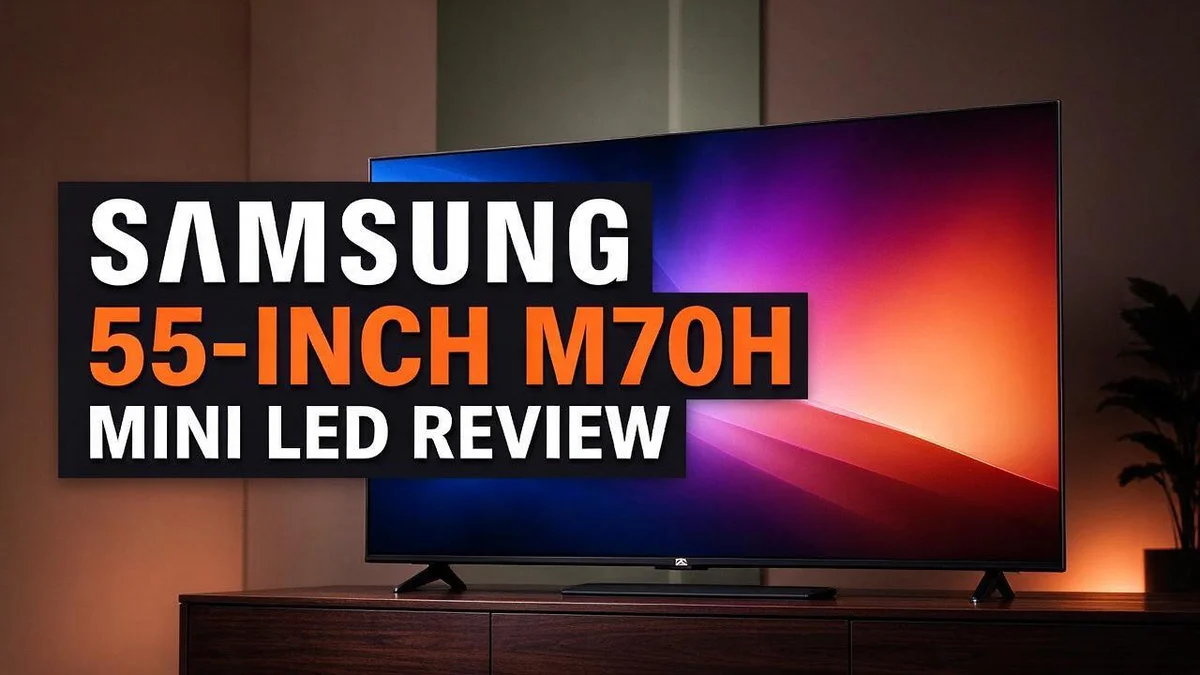
Looking for a TV that makes everyday shows look sharp? The Samsung 55 inch M70H Mini LED might be the one you need.
Picture quality is the big story here. Customers often praise its colors and Mini LED performance. One reviewer noted better contrast, deeper blacks, and more noticeable HDR.
Think about how you watch. You get a wide viewing angle, so friends on the couch see the same clear image. The 120Hz refresh rate is a listed feature.
But no TV fits every room perfectly. Some critics point out a bluish tint and weaker motion handling. This review looks at what works, what does not, and who should buy it.
In a Nutshell
- Strong contrast for dark rooms: Reviewers say blacks look deeper on this set. Bright highlights also stand out more clearly.
- A wide viewing angle: Friends sitting off to the side still see a similar picture. This helps during family movie nights.
- Smart features built in: Google TV and Google Cast make streaming simple. Free 4K movie credits also come with the TV.
- Plenty of ports for gadgets: The TV offers three HDMI inputs and one USB port. Some listings mention four HDMI 2.1 ports, so check your setup before you buy.
- Points to consider: Some critics say the colors lean slightly blue. Motion handling and upscaling also received mixed feedback.
- Dimming settings are hidden: Global and local dimming controls sit behind the Service Menu. Tech fans may want to explore that menu for better dark scenes.
- Other sizes and rivals: The same design comes in 43 and 50 inch sizes. Shoppers often compare it with the Samsung M80H, QN80H, U8000H, and LG QNED.
Picture Quality and Contrast

- MINI LED PROCESSOR 4K: Our advanced processor delivers brighter highlights and deeper blacks,* bringing every...
- PURE COLOR SPECTRUM: delivers one billion true-to-life colors, powered by advanced color technology and...
- MINI LED HDR: Experience HDR picture quality with brighter highlights and deeper blacks than traditional HDR...

Last update on 2026-09-13 / Affiliate links / Images from Amazon Product Advertising API
Picture quality is the main reason people look at the Samsung 55 inch M70H Mini LED. Customers often praise how the screen performs with Mini LED technology. The set aims to give a clean and lively image.
HDR content looks especially striking on this set. A reviewer noted that high dynamic range scenes appear more noticeable than on many standard TVs. Bright sunlight, neon signs, and sparkling stars pop off the screen.
Native 4K content gets the best treatment. The panel shows fine detail when the source is true 4K video. Older shows and standard cable channels look less crisp because the TV struggles with upscaling.
Fast action can look less smooth. The 120Hz panel helps with motion, but some critics say the motion handling still falls short. Quick pans across a stadium may blur a little. Sports fans may want to test a few games before they decide.
Dark scenes can still disappoint some owners. One buyer reports that very dark moments look weaker than expected. Watching a night scene in a store or with a friend can help you judge this.
Calibration plays a big role here. Fine tuning brightness and sharpness helps the picture match your room. Try a bright movie and a dark film to see how the set reacts.
Room lighting changes everything. Bright windows can wash out subtle shades, while a dim room shows off the best detail. Dim lights around the set help the contrast look richer. Place the TV where glare stays low for the best view.
Text and fine lines need a closer look. Small captions and sports graphics can appear soft at times. Sitting close may make this softness easier to notice.
Overall the picture earns strong marks for most viewers. Bright, sharp, and colorful scenes shine on this set. Just expect some trade offs with motion and older content.
Motion and Gaming Performance
Gamers often want a screen that responds quickly. The Samsung 55 inch M70H comes with a 120Hz panel, which gives many players a solid starting point.
Motion handling is the weak spot for some owners. Critics say movement does not always look clean. Upscaling also draws complaints, so older games and lower resolution sources may look soft on this set.
Your console sets the tone. A console that sends a true 4K signal will look sharper than one sending a lower resolution picture. Check your output settings before you judge the image.
Sports fans face a similar test. Fast balls and quick camera pans show motion flaws more clearly than slow dramas do. Pick a match you know well and watch how the picture moves.
Picture modes can also change how motion looks. Some modes sharpen edges while others smooth movement. Try a few options during a game session and keep the one that feels best.
Input delay is another factor to check. Input lag is the gap between pressing a button and seeing the result on screen. Look in the menu for a gaming or low latency option.
Many players feel this delay more than they notice blur. Turn that option on before you play fast titles.
Room lighting plays a part too. A bright room can hide some blur, while a dark room exposes every flaw. Think about where the TV will sit before you settle on a final setup.
Racing and shooter games demand fast reactions. Fast racing titles reveal motion flaws quickly, so they make a useful test. If you play these genres often, watch a demo or ask a friend to show you a session first.
Long sessions matter as well. Staring at fast motion for hours can tire your eyes. Take short breaks and adjust the brightness so the screen feels comfortable.
Keep your expectations realistic. No TV handles every game perfectly. Seeing the screen in action helps you decide whether it fits your play style.
Smart TV Platform and Ports
The smart platform shapes how this TV feels every day. The Samsung 55 inch M70H runs a QLED Smart Google TV system. Your favorite apps sit within easy reach.
Free 4K movie credits come with the set. You can start watching top titles right away. Many viewers enjoy this extra perk.
Google Cast adds another layer of flexibility. You can send videos and music from a phone straight to the screen.
The phone then becomes a handy remote for the moment.
Connections matter just as much as software. The listings show three HDMI inputs and one USB port.
Some listings mention four HDMI 2.1 inputs instead. Check the exact details before you set up your room.
Plan your setup first. Count every device you want to connect. A game console, soundbar, and streaming stick can fill ports fast.
HDMI 2.1 supports higher frame rates and resolutions. If your console needs that, confirm the port version.
The single USB port suits flash drives and photo files. Use a small hub if you need more connections.
The TV also connects to your home network wirelessly. A strong signal keeps streaming sharp and steady.
If buffering appears, move your router closer to the TV.
Labeling inputs saves time on busy days. Many Samsung sets let you rename each source so the names match your devices.
Some critics have criticized the operating system. Give the menus a few days of use before you decide.
Future gadgets may need room too. Keep at least one spare HDMI port open for a new player or box.
Think about where cables run behind the stand. Neat cable paths make the TV look cleaner and easier to service.
A solid platform and useful ports give this TV a flexible base. Spend a few minutes organizing apps and inputs. A tidy setup makes daily viewing feel smooth.
Top 3 Alternatives
If the original TV does not fit your needs, these three alternatives are worth a look. Each one offers strong picture quality for movies, sports, and gaming.
Hisense U8 Mini LED

- MINILED PRO WITH UP TO 5000 NITS PEAK BRIGHTNESS AND UP TO 5600 LOCAL DIMMING ZONES: See the realism of every...
- HI-VIEW AI ENGINE PRO: Enjoy the game from home, but feel like you’re there. Powered by the Hisense...
- NATIVE 165HZ PANEL WITH GAME BOOSTER 288: Turbo power your gaming! The Native 165Hz Panel has a Variable...
Last update on 2026-09-30 / Affiliate links / Images from Amazon Product Advertising API
Looking for a bright TV that handles sunny rooms well? The Hisense U8 Mini LED is a strong pick. It uses many tiny LED zones to control light across the screen. This helps dark scenes look deep and highlights look bright. Gamers will enjoy its quick response and smooth motion. Movie nights also feel more lively thanks to rich, natural colors.
TCL QM8 Mini LED

- SQD-Mini LED: As the ultimate Mini LED TV, it integrates the expansive TCL Deep Color System with the...
- TCL Ultra Color Filter: TCL’s Ultra Color Filter with fine 5 nanometer particles (vs. standard 60 nanometer...
- High Static Contrast: Experience exceptional picture quality driven by a high 7000:1 contrast ratio for...
Last update on 2026-09-13 / Affiliate links / Images from Amazon Product Advertising API
The TCL QM8 Mini LED suits people who love home theater setups. It uses quantum dot color to produce vivid and lifelike images. Local dimming keeps dark scenes sharp without washing out details. Sports fans will appreciate the strong brightness and wide viewing angles. Setup feels simple, so you can start watching right away.
LG QNED Mini LED
No products found.
The LG QNED Mini LED brings a fresh look to the list. It pairs Mini LED backlighting with quantum dot technology for bold, accurate color. Many viewers like its clean design and easy smart features. It performs well in bright living rooms and dim media rooms alike. If you want one TV for almost every space, this model deserves a close look.
Color Accuracy and Viewing Angles
Color accuracy starts with the picture mode you choose. Many owners find the default setting too bright and cool. Switching to a movie or custom mode can bring skin tones closer to natural.
Critics often describe the picture as overly blue. That cool tint can make white walls and clouds look cold. Lower the color temperature to Warm for a softer look.
Grayscale settings matter too. A neutral gray balance helps the screen show true shades in both bright and dim scenes. Many people skip this step, but it often gives the best results.
Viewing angles are a strong point on this model. Colors hold up well when you sit to the side of the screen. You will notice less color shift than on many older LCD sets.
The view from far off center still changes. Brightness can drop and colors may look washed out. Side seats may still look slightly dim. Seat people near the center line for the most natural picture.
Room light changes how color looks. Lamps and windows can cause reflections that dull the screen. Place the TV so light hits it from the side, not straight on.
Try a simple test before you settle. Pick a show with faces you know well. If skin looks orange or gray, adjust the color settings a little at a time.
Check your settings in daylight and again at night. Colors can look different as the sun moves across the room. Small tweaks keep the picture steady all day. Take notes on the settings that look best.
Good color and wide angles make the M70H a pleasant choice for family movie nights. Set a neutral mode, sit near the center, and enjoy a natural look. Your family will notice the difference.
Value for Money
The real question is what you get from this TV. Picture quality sits at the heart of the M70H. Owners often praise its Mini LED panel for a clear and lively image.
Reviewers note better contrast and deeper blacks than many standard screens. Highlights also look brighter, so HDR content feels more vivid. That difference shows most during movie nights.
The 120Hz refresh rate adds smooth everyday viewing. Pure Spectrum Color and the Mini LED Processor 4K work together to shape each frame.
Size options give you room to choose. Listings show 43 and 50 inch versions alongside the 55 inch model. A smaller screen suits a bedroom, while the larger one fills a living room.
The Titan Black finish blends into most rooms. A dark frame keeps attention on the picture, not the stand. This helps the set look at home in many spaces.
Some tuning options sit behind a Service Menu. Critics say global and local dimming are locked there. Owners willing to dig into that menu may get more out of dark scenes.
The Samsung M80H covers the same range from 55 to 85 inches. The QN80H and U8000H offer other feature sets for shoppers with different goals.
Feature for feature, the M70H packs a lot into one set. Mini LED, 120Hz, HDR, and smart apps come standard.
Think about your viewing habits. Movie fans may value the picture most of all. Casual viewers may care more about easy setup and daily streaming.
Overall, this set suits people who want strong picture quality in a sleek design. It may not satisfy anyone who expects perfect motion or endless tuning options.
The best fit comes from features that match daily life. Pick the size and picture strengths you use most, and skip the rest.
Pros and Cons
Pros
- Customers praise the picture quality on this set.
- Mini LED technology lifts the image for everyday viewing.
- HDR content looks more noticeable on screen.
- The image looks sharp and detailed for movie nights.
- The wide viewing angle keeps the picture steady from the side.
Cons
- Reviewers report weak motion handling during fast action.
- Lower resolution content looks less sharp when upscaled.
- Some critics dislike the Tizen operating system.
- One buyer says dark scenes still look weak.
Who Should Buy It
Movie fans often enjoy this set the most. It suits people who love films with rich colors and bright highlights. Watching a favorite movie on a large screen feels special.
A medium living room is the sweet spot. Most viewers sit about 8 to 10 feet away. A 55 inch screen fills that space nicely without overwhelming the room.
Families with teens often like it too. Everyone can choose their own streaming app and find a show fast. Movie nights feel easy for the whole group, and nobody has to wait for a slow menu.
Casual viewers also fit well. If you mostly watch news, sitcoms, or cooking shows, you get a clean and pleasant picture. You do not need to fuss with the settings every night. Turn it on and relax.
People who love to tweak every setting may feel held back. Picture tuning takes more effort here. Patient owners can still find a comfortable middle ground, but hands-on tinkerers may want more control than this model offers.
Sports fans and gamers should look closer before they decide. Fast action can look rough, so smooth motion matters more to them. Those shoppers may prefer a set built for quick scenes and sharp movement.
Small rooms may not need this size. A 43 inch model could sit better on a bedroom stand or a compact desk. Think about your space and seating first. The right size makes the whole viewing experience more enjoyable.
First time buyers often want a simple setup. This set connects with common streaming apps and works well with a Google account. That makes the first week of use feel less stressful.
Bottom line: this TV suits relaxed movie nights and everyday shows. It fits best when comfort and picture quality matter more than fine control. Skip it if fast action is your top priority.
Final Verdict
The Samsung 55 inch M70H earns a spot on many shortlists. It offers a strong picture, smart features, and a clean design. Still, a few details deserve a closer look before you commit.
Check the port count first. Listings disagree on the HDMI setup. One shows three HDMI inputs, while another lists four HDMI 2.1 ports. Confirm the exact number on the product page before you buy.
Plan your setup before the box arrives. Measure your wall space or stand width first. Check that your favorite streaming apps load smoothly on Google TV. Good planning prevents small surprises later.
Try a side by side comparison. The M70H and M80H share the same size range, from 55 to 85 inches. Seeing them together helps you judge contrast and color with your own eyes.
Think about the sound too. The picture gets most of the attention, but audio matters for movies. Many buyers add a soundbar for fuller sound and clearer dialogue.
Future upgrades deserve thought as well. A larger screen may appeal later, so the M80H line could suit those plans. Keep the M70H if the 55 inch size fits your room today.
Set realistic expectations for your favorite content. Streaming shows in high quality will look their best here. Keep your main sources in mind when you judge the result.
Return policies matter too. Check the terms at your retailer before you buy. A simple return window gives you time to test the set at home.
Final take: The M70H suits people who want a bright, detailed picture with smart features in one clean package. Know its limits, confirm the ports, and compare it side by side with rivals. Then you can choose with confidence.
Ultimately, your viewing habits decide the winner. Think about what you watch most, then match the set to those needs. That approach leads to a happier choice.
Frequently Asked Questions
Can I stream videos from my phone to the M70H?
Yes. The set supports Google Cast, so you can send videos and music from your phone. Open a supported app and tap the cast icon. Your phone and TV must use the same home network.
How far should I sit from a 55 inch screen?
Most people sit about six to nine feet away. This range shows plenty of detail without causing eye strain. Sitting closer makes the picture look sharper, but it can feel too large for everyday shows.
Will the dark finish work in a bright room?
The Titan Black frame blends into the wall, so the screen stays the focus. Bright windows can still cause glare on any TV. Place the set away from direct sunlight for the best view.
Can I change the picture settings myself?
Yes. Most everyday options, like picture modes and brightness, sit in the main menu. Start with a preset mode and adjust from there. This approach saves time and helps you find a look that suits your room.

Tian is a passionate technology enthusiast and reviewer who explores the latest in AI tools, gadgets, and digital innovations to help readers make informed tech decisions.