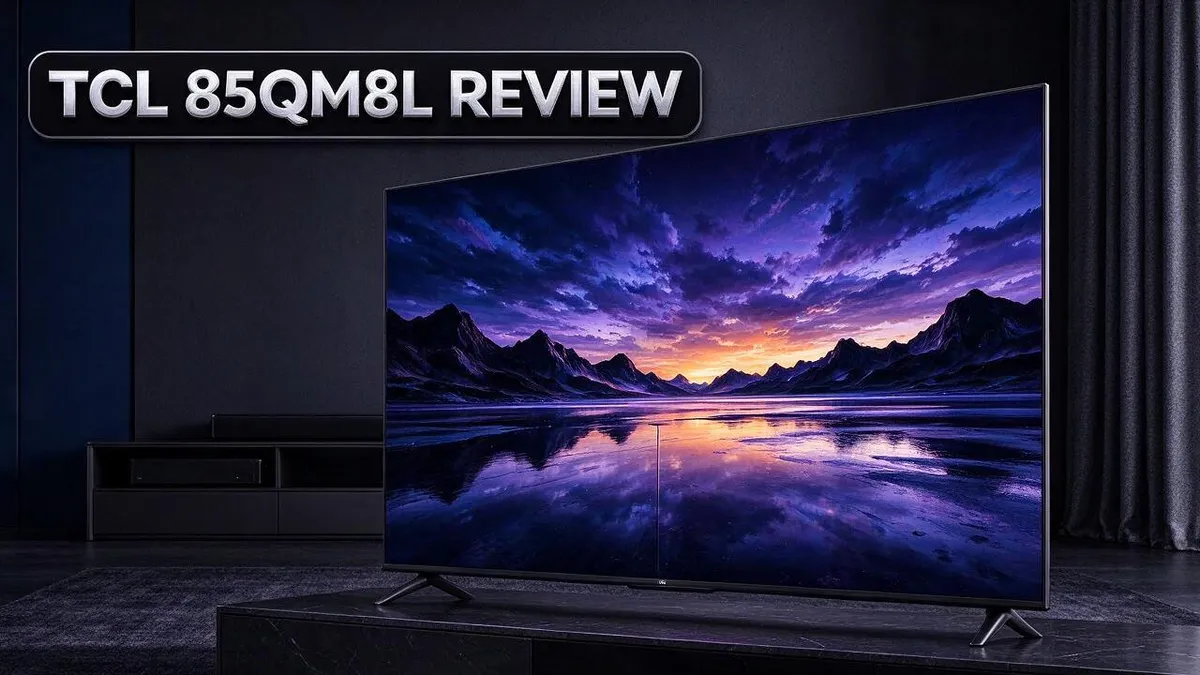
TCL 85QM8L Review: Picture Quality, Sound, and Smart Features Tested
Looking for a TV that makes movies and shows pop? The TCL 85QM8L might be the one. This big screen mixes strong brightness with rich color, so your favorite scenes look lively day or night.
Many shoppers want a sharp picture without a confusing setup. This model offers a 4K UHD display, Dolby Vision IQ support, and four HDMI 2.1 ports for gaming and streaming devices. Reviewers often praise its picture quality.
The sound system also stands out. Dialogue sounds clear, bass feels clean, and height effects add a nice touch. Want to know if it fits your room? Keep reading to see how it performs, where it falls short, and who should buy it.
In a Nutshell
-
Bright picture with deep contrast. The screen reaches up to 6,000 nits, so daytime shows look vivid. More than 4,000 local dimming zones keep dark scenes detailed.
-
Ready for gaming. Four HDMI 2.1 ports and a high refresh rate keep fast action smooth. Gamers can enjoy quick motion on modern consoles.
-
Works with antenna signals. The ATSC 3.0 NEXTGEN tuner reads newer broadcast signals. Viewers who use an antenna can catch the latest over-the-air channels.
-
Hands-free control. Google Gemini lets you speak commands to the TV. Simple voice requests help you find shows and adjust settings fast.
-
Color needs a small tweak. Colors look good right out of the box. A quick picture setting adjustment can bring out even more accuracy.
-
Compare before you choose. This model competes with the TCL QM8, Hisense U8N, and LG C5 OLED. Shoppers should review each option side by side to find the best fit.
Picture Quality and Brightness

- SQD-Mini LED: As the ultimate Mini LED TV, it integrates the expansive TCL Deep Color System with the...
- TCL Ultra Color Filter: TCL’s Ultra Color Filter with fine 5 nanometer particles (vs. standard 60 nanometer...
- Wide Viewing Angles: Enjoy vibrant colors and perfect contrast, no matter where you sit, thanks to...

Last update on 2026-09-14 / Affiliate links / Images from Amazon Product Advertising API
Picture quality is where the TCL 85QM8L really stands out. The TV uses SQD Mini LED technology with more than 4,000 local dimming zones. Each zone controls light in a small section of the screen.
This setup keeps dark scenes deep and rich while bright details still pop. Fewer halos appear around bright objects. Stars in a night sky look crisp, and subtitles stay clear in dim scenes.
Dolby Vision IQ adds another layer of control. It adjusts the picture based on the light in your room. The image looks steady during the day and at night.
The 4K UHD resolution fills the large screen with fine detail. Faces, fabrics, and landscapes look sharp from across the couch.
Color needs a little setup work for the best results. Start with a movie or cinema picture mode. Then lower any overly bright settings to keep skin tones natural.
Compared with the LG C5 OLED, this TV trades perfect black levels for much greater brightness. OLED still wins in a fully dark room. The TCL, however, handles bright living rooms with ease.
Streaming HDR shows look bold and layered. Explosions, neon signs, and sunlit landscapes stand out against the dark background.
One user reports concerns about a so-called screen lottery, where picture quality may vary from unit to unit. This claim remains unverified. Still, checking the return rules before you buy is a smart move.
A moderately lit room gives you the best view. The screen still performs well in brighter spaces, so you can enjoy it in most rooms.
Sound Performance
Sound is a strong point for this TV. Many buyers overlook audio, but it shapes how a movie feels. The onboard speakers handle everyday viewing well.
Dialogue stays easy to follow. Talk shows and news anchors sound clear, so you rarely need captions.
Bass stays clean instead of muddy. Low sounds in thrillers and music come through without rattling. You still feel the rumble during action scenes.
Height effects add some depth. Rain, birds, and helicopters seem to move above the screen. The effect is decent, though it does not match a dedicated surround setup.
Voices stay sharp at lower volume. You do not need to crank the sound to hear every word. Dialogue remains clear even when the room is quiet.
Pair it with a soundbar for bigger scenes. A soundbar adds wider stereo and fuller low end. Connect it through one of the HDMI ports to keep the setup simple.
Speaker placement matters more than many expect. Keep the TV away from hard walls when possible. Open space below the screen helps sound reach your couch.
Switch between preset sound modes to match what you watch. Small changes can sharpen dialogue or open up the mix.
Sports fans will enjoy the crowd noise. Stadium roars feel wide and lively, which makes game nights more fun for friends and family.
Quiet scenes keep their tension. Sudden sound effects still hit with enough force to startle. This balance helps horror and suspense movies feel engaging.
Gamers should also check their audio output. Game sound effects can differ from movie tracks. Adjust the level so footsteps and alerts stay easy to hear.
Final thoughts on audio. The sound suits everyday viewing and casual fans. Movie lovers who want deeper bass can add a soundbar or subwoofer later.
Design and Smart Features
The TCL 85QM8L keeps its look simple and clean. A dark frame surrounds the large screen, so the picture stays the focus of the room.
Setup takes little time for most people. You attach the stand or plan a wall mount, plug in your cables, and follow the steps on screen.
Wall mounting suits a room this size. Check the mounting pattern on the back panel first. Then choose a mount rated for an 85 inch screen.
Google TV turns the home screen into a hub. Apps, live channels, and suggested shows sit in clear rows. You can reach a show without digging through layers of menus.
Your favorite apps can move to the front of the home screen. Remove the apps you never use to keep the layout tidy.
Search finds titles across apps at once. You enter a movie or show name, and the results show which services carry it. This saves time when you hunt for something to watch.
Profiles make the TV friendly for the whole household. Each person can save their own watch history and get suggestions that fit their taste.
Parental controls give families extra peace of mind. Parents can set age limits for content and lock certain apps with a PIN.
Software updates arrive over the internet. Keeping the system current brings new features, app support, and security fixes.
The remote control feels practical for daily use. Dedicated buttons for popular streaming services help you jump straight into your shows.
Many connected devices can join the same menu. Game consoles, streaming sticks, and cable boxes appear as inputs, so switching sources feels quick.
Input labels help you name each device, such as Xbox or a disc player. Your source list stays easy to read.
The settings menu groups options in one place. Picture, sound, and network controls sit in sections that are simple to find. Everyone at home can find what they want fast.
Top 3 Alternatives
Looking for other TV options? These three alternatives to the TCL 85QM8L are worth a closer look.
Hisense U8 Series

- MINILED PRO WITH UP TO 5000 NITS PEAK BRIGHTNESS AND UP TO 5600 LOCAL DIMMING ZONES: See the realism of every...
- HI-VIEW AI ENGINE PRO: Enjoy the game from home, but feel like you’re there. Powered by the Hisense...
- NATIVE 165HZ PANEL WITH GAME BOOSTER 288: Turbo power your gaming! The Native 165Hz Panel has a Variable...
Last update on 2026-09-30 / Affiliate links / Images from Amazon Product Advertising API
The Hisense U8 Series offers bright and vivid picture quality. It handles sunny rooms well, so glare is less of a problem. Gamers will enjoy its fast response and smooth motion during action scenes. Its large screen sizes make movie nights feel special. Streaming apps load quickly, and the voice control is easy to use from your couch.
Samsung Q80C

- MINI LED WITH AI MODE: Mini LED with AI Mode combines compact, high-efficiency Mini LEDs with intelligent...
- MOTION XCELERATOR 144HZ: Get the edge in fast-paced games and sports with ultra-smooth 144Hz performance...
- PURE SPECTRUM COLOR: Pure Color Spectrum delivers one billion true-to-life colors, powered by advanced color...
Last update on 2026-11-07 / Affiliate links / Images from Amazon Product Advertising API
The Samsung Q80C is a great pick for people who love deep, rich colors. Its quantum dot panel shows bright shades and clean details. Sound is clear and balanced for most living rooms. The sleek design fits well on a stand or against a wall. Samsung smart features make finding your favorite shows simple.
Sony X85L

- MINI LED BRIGHTNESS AND CONTRAST: Thousands of Mini LEDs are precisely controlled by XR Backlight Master Drive...
- BILLIONS OF REAL-WORLD QLED COLORS: Access billions of accurate real-world colors with QLED technology and XR...
- POWERFUL TV PROCESSING: XR Processor intelligently enhances every scene in real-time boosting color, contrast...
Last update on 2026-09-13 / Affiliate links / Images from Amazon Product Advertising API
The Sony X85L focuses on natural-looking images. Its processor helps reduce blur during fast action scenes like sports. Many viewers like how skin tones look warm and real. The set also works well with popular game consoles. It is a solid choice for families who watch many different shows.
Each of these TVs brings something useful to the table. Think about your room size, your viewing habits, and the content you watch most. With those details in mind, you can choose the set that fits your home best.
Gaming and HDMI 2.1 Performance
Gamers want smooth motion and quick response. The TCL 85QM8L checks both boxes with four HDMI 2.1 ports. That means you can connect a current console and a gaming PC at once.
The high refresh rate helps fast scenes look clean. Racing games, shooters, and sports titles show less blur during quick camera moves. Fast action feels more natural on a big screen.
Input lag matters just as much as motion. A faster response gives you a better sense of control. Turn on game mode in the picture menu before you start playing.
Setup takes only a few minutes. Open your console settings and select the highest output your TV supports. Then confirm the display shows the correct resolution and frame rate.
Mixed sources are easy to manage on this TV. Keep your console on one HDMI 2.1 port and your PC on another. Label each port in the input menu so switching feels quick.
Long sessions also deserve some attention. Give the TV some space for airflow during marathon play. Avoid stacking it inside a tight cabinet.
Gamers who want the smoothest result should test a few settings. Try different picture modes and find the look that feels right. Your eyes will tell you which setting works best.
Console owners can also check the frame rate settings. Many games offer a performance mode that favors smooth motion. Choose it when speed matters more than extra detail.
PC players should confirm the graphics card output matches the TV. Use a certified cable that supports the full bandwidth. A weak cable can limit the signal and reduce performance.
Fast games reward a quick setup, so spend a few minutes tuning before your first match. Small changes can make a big difference in how responsive the screen feels. Gaming sessions feel best when the setup stays simple.
Setup, Tuning and Ease of Use
Getting started feels simple with this TV. Turn it on and follow the guide on the screen. It asks for your language, wireless network, and Google account.
Run the antenna scan early. The ATSC 3.0 NEXTGEN tuner picks up local channels sent in the newer broadcast format. Scan once after setup so every channel appears in your guide.
Try Google Gemini for hands-free control. Say what you want to watch, and the TV responds. You can also ask it to open apps or adjust basic settings.
Check the panel early. One owner reports screen lottery concerns, though that claim is unverified. A quick look still helps you feel confident.
Play a dark scene and a bright scene. Watch for uneven glow or odd tint. Contact the seller quickly if something looks off.
Start with a preset picture mode. Colors look good out of the box, but they are not perfectly tuned. Pick a movie preset for films and a brighter option for sports.
Adjust picture settings in small steps. Change brightness first, then contrast, then color. Small moves keep the image natural. Big jumps can wash out skin tones.
Let Dolby Vision IQ adapt to your room. It adjusts the picture as room light changes. Keep it on for bright daytime viewing. Turn it off for a fixed look at night.
Keep the software current. Updates can improve app performance and picture behavior. Turn on automatic updates in the settings menu.
Save your favorite settings. Write down your values or take a photo of the menu. You can restore them fast if an update changes things.
Pair a Bluetooth remote or headphones through the settings menu. Most devices reconnect on their own after the first pairing.
A few minutes of tuning pays off. Your first movie night will look and sound just right, and you will feel at home with the menus.
Pros and Cons
Pros
– Bright screen with strong, vivid color
– Dolby Vision IQ adjusts the picture to the room’s light
– Clear dialogue and clean bass from the built-in sound
– More than 4,000 local dimming zones for deeper contrast
– Reviewers often praise the overall picture quality
Cons
– Colors look good at first but are not perfectly tuned
– One owner’s panel concern remains unverified
– The 85 inch size may overwhelm a small room
Who Should Buy It
The TCL 85QM8L fits people who want a big, bright picture for everyday viewing. It suits families who gather around one screen on busy weekends.
Sports fans often find this set a strong match. Bright highlights and lively color make live games and race broadcasts feel fast and exciting.
Daytime viewers also benefit. Sunlit living rooms can wash out dim screens, but this panel holds its image well when light pours through the windows.
Cord cutters will like the mix of apps and broadcasts. Streaming services and local channels sit side by side, so switching between them feels easy.
Upgraders have a clear reason to consider it. Anyone moving from an older LCD set will notice a big jump in brightness and color. Your old set may look dull after a few days of comparison.
Some shoppers should look elsewhere. People who need deep black levels in a dark room may prefer an OLED model like the LG C5.
Those who want a perfectly calibrated image may need a professional calibrator after setup.
Cinema purists may still want extra audio gear. The included speakers handle daily shows well, but a soundbar can add more depth for action films.
Buyers who stream most of their shows will feel at home here. The smart menu puts favorite apps in one place, so finding a show takes little time.
Home office workers may find the screen useful for side by side windows, though a monitor usually suits desk work better.
Small room owners should measure first. Check the wall width and sofa distance before you commit to this screen size. Measure the height too, since a tall screen can block a low cabinet.
Renters who move often should think about size and weight. Large sets need two people to lift and mount them safely.
Finally, buyers who want a simple, all in one TV will appreciate the balance. The set covers movies, sports, and streaming for most homes.
Final Verdict
The TCL 85QM8L is a strong choice for big screen fans who want a bright picture. It handles movies, shows, and sports with ease. Most shoppers will feel happy with the results.
Measure your space before you buy. An 85 inch screen is wide, so check that the stand or wall mount fits your room. Sit far enough back that the whole picture fills your view without strain.
When you compare it with rivals, the field gets crowded fast. The TCL QM8 from 2024 is a close cousin, so check both in person if you can. The Hisense U8N and TCL QM7L also deserve a spot on your shortlist.
If deep black levels matter most to you, an OLED set such as the LG C5 may suit you better. Mini LED models like this one trade some black depth for extra brightness. That trade works well in bright rooms.
Roku fans have another path. The Roku Pro Series offers a different smart platform for shoppers who prefer Roku menus over Google TV. Pick the interface that feels easiest for your family.
Software matters too. Google TV usually receives updates over time, so the set should feel fresh for years. Check the update history of any model you consider.
Before you commit, run a few tests during the first week. Watch a movie at night, then again in the afternoon. Keep the box and packaging until you feel sure about the picture.
In short, this TV rewards buyers who want size, brightness, and easy streaming. Choose it if your room gets plenty of light and you sit at a comfortable distance. Skip it if you want the deepest blacks in a dark room. Your viewing habits should guide the final decision.
Frequently Asked Questions
Can I use this TV for gaming?
Yes, the set has four HDMI 2.1 ports. Connect your console to one of these ports for a smooth picture during fast action. Check your console settings to confirm the correct output.
Can I watch free channels without a cable box?
Yes. The TV includes an ATSC 3.0 NEXTGEN tuner. Connect an antenna to watch over the air broadcasts for free. Signal strength depends on your location, so test a few antenna positions.
Can I control it with my voice?
Yes, it supports Google Gemini hands-free control. Ask it to find shows or handle simple tasks. Keep the remote nearby for quick fixes when voice commands miss.
How far should I sit from an 85 inch screen?
Most people sit about 7 to 9 feet away from a screen this size. Sitting too close can make the image hard to take in. Measure your seating area before you set up the TV.

Tian is a passionate technology enthusiast and reviewer who explores the latest in AI tools, gadgets, and digital innovations to help readers make informed tech decisions.