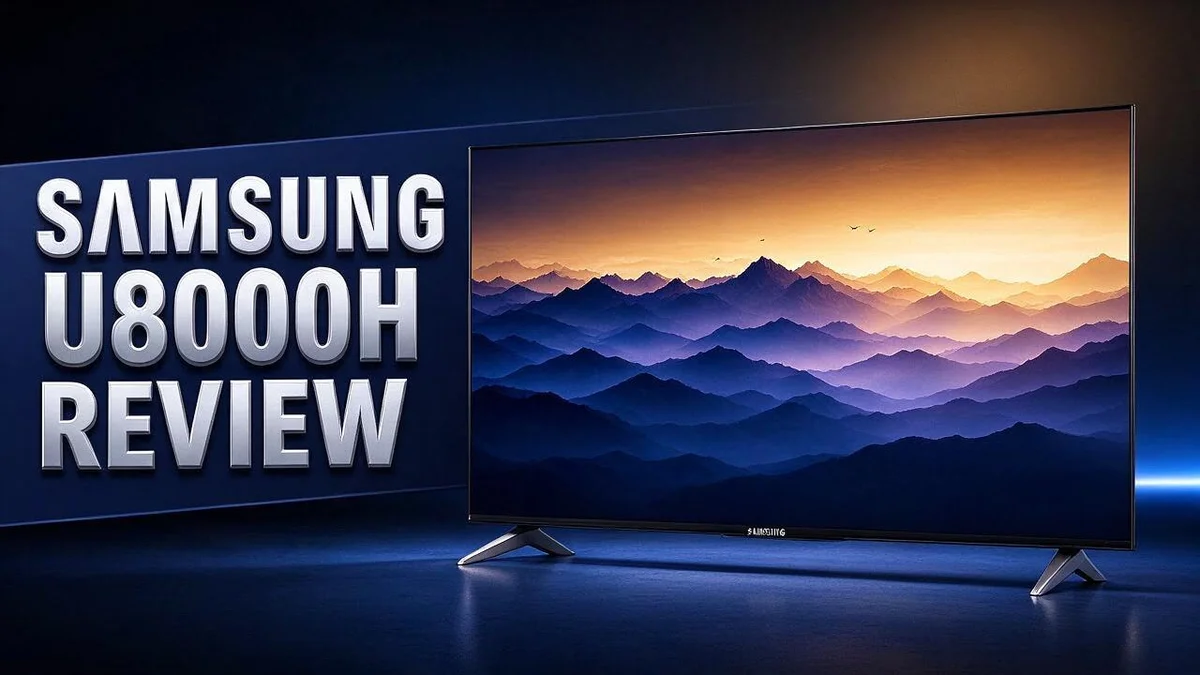
Samsung U8000H Review 2026: Picture Quality, Smart Features, and Verdict
Looking for a big screen that delivers sharp 4K visuals without stretching your plans? The Samsung U8000H might be the TV you need. It sits in Samsung’s lineup as the brand’s only entry level 4K UHD TV for 2026.
Here is what makes it stand out. It uses a Crystal Processor 4K and Motion Xcelerator for smoother movement. Color Booster adds vivid tones, and Samsung Vision AI brings smart features to your living room.
Sizes range from 50 to 75 inches, so you can find a good fit for your space.
One reviewer rated the picture, sound, and overall experience a perfect 5 out of 5. Another reviewer felt differently, pointing to dull colors and low peak brightness.
So is it the right pick for you? Keep reading to see how the U8000H compares with its rivals.
In a Nutshell
-
Entry level 4K choice: Samsung positions the U8000H as its only entry level 4K UHD TV for 2026. It looks similar to the U8000F but adds a few extra features.
-
Smooth viewing basics: The panel uses a 60 Hz refresh rate, which suits everyday shows, movies, and sports. Color Booster also adds richer tones to the picture.
-
Smart features built in: Samsung Vision AI works with Vision AI Companion to help you get more from the screen. The TV runs on Tizen OS, so the menus stay simple to browse.
-
Strong reader feedback: A 58 inch listing shows 4.8 out of 5 stars from 39 reviews. One review also mentions a five year Best Buy warranty.
-
Mixed opinions to consider: One reviewer called the TV poor overall. That reviewer pointed to dull colors, lackluster picture quality, and low peak brightness.
-
Top rivals to compare: The Samsung U7900F, U8000F, M70H, and M80H are the main alternatives. Check how each one fits your room and viewing habits before you decide.
Picture Performance

- 4K UHD Display / 60 Hz with edge-lit VA LED panel; native 60 Hz refresh rate supported by Motion Xcelerator...
- Crystal Processor 4K + HDR10+/HLG: Upscales lower-resolution content to near-4K. Supports HDR10+, HLG, UHD...
- Audio: 20 W 2‑Channel with OTS Lite & Q‑Symphony: 2CH speakers with 20 watts total output; features...
Last update on 2026-11-07 / Affiliate links / Images from Amazon Product Advertising API
A TV lives or dies by its picture, so this part matters most. The U8000H uses a 4K Crystal UHD LED panel that aims to deliver clear detail. Let’s look at what you can expect.
Samsung adds Color Booster to help the screen show richer shades. Bright scenes like sunsets and nature shows can look more lifelike with this feature. However, one reviewer described the colors as dull, so results may vary by room and setup.
Brightness is another key factor for picture quality. The same reviewer pointed to low peak brightness as a weak spot. If your living room gets lots of sunlight, this detail deserves extra attention.
Dark rooms often show contrast better than bright ones. Contrast controls how deep the blacks look on screen. Bright light can wash out shadow detail, so plan your seating and window placement carefully.
Good picture quality depends on more than the TV itself. Room lighting, seating distance, and settings all shape what you see. Small changes to brightness and contrast can make a noticeable difference.
Screen size also affects sharpness from your seat. A 4K panel shows fine detail best when you sit at a suitable distance. Choose a size that fits your room so the picture looks clean rather than overwhelming.
Real world viewing is the best test. Watch a favorite movie, game, or show before you decide. Pay close attention to skin tones, dark scenes, and fast action. Your own eyes matter most.
Many viewers seem happy with the overall look, though opinions differ. The U8000H can handle everyday viewing well for many households. Still, check the picture yourself to see if it meets your expectations.
Smart Features and Vision AI
Smart features often decide how much you use a TV every day. Good menus keep everything within easy reach.
The Samsung U8000H runs on Tizen OS, Samsung’s own platform for menus, apps, and settings.
Think about your daily routine for a moment. You might stream a movie at night and check the news in the morning.
A simple home screen makes switching between these tasks quick. Try it before you commit.
Samsung presents Vision AI as a way to tune the viewing experience. Think of it as a helper built into the TV.
Many smart TVs let you share content from your phone. Check whether your phone and other devices connect easily.
Your favorite apps matter more than flashy extras. Make a short list of the streaming services you use most often.
Look in the app store to confirm those services appear. Missing apps can slow down your daily viewing.
Many smart TVs can collect viewing data. Review the privacy settings during setup to choose what you share.
Software updates can add new features over time. This helps your TV stay useful for longer.
A steady internet connection matters a lot. Streaming in high quality needs consistent speeds.
Place the TV within good range of your router. This helps apps load faster and reduces buffering.
Voice search can save time when you hunt for shows. Many smart TVs support it through the remote or a connected device.
Some viewers find the smart menus less impressive than the picture. Test them yourself before deciding.
The best test is simple. Spend ten minutes browsing apps, settings, and casting options on the TV.
Ask yourself how you watch most nights. Smart features should match your habits, not someone else’s.
In short, the smart side of the Samsung U8000H can make daily viewing easier. Pick features that fit your life, and test them before you settle in.
Design and Available Sizes
Size matters more than many shoppers expect. The Samsung U8000H comes in four sizes: 50 inch, 58 inch, 65 inch, and 75 inch. Each one suits a different room and seating setup.
The 50 inch model works well in a bedroom or small study. It fits neatly on a dresser or a small media unit.
The 58 inch size sits in the middle of the range. It often suits a mid size living room where the couch sits a few steps back.
The 65 inch model is a popular choice for family rooms. It gives a bigger view for movie nights without filling the whole wall.
The 75 inch option makes the biggest impact. It works well in open plan spaces where everyone wants a front row feel.
Measure before you buy. Mark the screen width on painter’s tape against your wall or stand. This simple step shows whether the size feels right in your room.
Seating distance also guides the choice. A common guideline links the ideal viewing distance to the screen width, so bigger sizes need more room. Sitting too close can make the picture feel overwhelming.
Check the stand width and wall mount options on the product page. These details affect placement as much as the screen size itself.
Think about where the TV will live. A corner, a cabinet, or a wall bracket each needs a different footprint. Plan the space first, then pick the size that fits.
Family habits can guide you too. Kids who play games may enjoy a larger screen, while a couple who watch the news may prefer a smaller one.
In short, the four sizes cover small rooms through large open spaces. Pick the one that fits your wall, your seating, and your daily routine.
Top 3 Alternatives
TCL QM6K

- TCL QM6K QD-MINI LED TV SERIES - AFFORDABLE PREMIUM PERFORMANCE FOR SPORTS, GAMING & STREAMING. Experience...
- QD-MINI LED. IT’S MINI LED PLUS QLED COLOR - BREATHTAKING BRIGHTNESS AND COLOR IN ANY LIGHT. Combines...
- TCL HALO CONTROL SYSTEM - BETTER BLACKS. SHARPER DETAIL. NO BLOOMING. Advanced local dimming eliminates...

Last update on 2026-10-13 / Affiliate links / Images from Amazon Product Advertising API
The TCL QM6K is a bright and colorful TV that works well in lit living rooms. It uses a mini LED backlight that delivers deep blacks and sharp contrast. Sports and action movies look lively on its screen.
The Google TV system makes streaming simple for the whole family. Many viewers find it a smart pick for everyday viewing. Its clear picture also keeps small text easy to read.
Hisense U8K

- MINILED PRO WITH UP TO 5000 NITS PEAK BRIGHTNESS AND UP TO 5600 LOCAL DIMMING ZONES: See the realism of every...
- HI-VIEW AI ENGINE PRO: Enjoy the game from home, but feel like you’re there. Powered by the Hisense...
- NATIVE 165HZ PANEL WITH GAME BOOSTER 288: Turbo power your gaming! The Native 165Hz Panel has a Variable...
Last update on 2026-09-30 / Affiliate links / Images from Amazon Product Advertising API
The Hisense U8K is a great choice for gamers and movie fans. It offers strong brightness and smooth motion for fast action scenes. Bold colors pop from every corner of the screen.
Its ULED panel handles glare well, so daytime viewing stays clear. Many buyers like its sleek design and simple setup. Gaming features also make it fun for consoles and PCs.
Sony X90L

- Sony Bravia XR 85 inch X90L 4K HDR Full Array LED Smart TV 2023
- LIFELIKE PICTURE– The intelligent and powerful Cognitive Processor XR delivers a picture with wide dynamic...
- FULL ARRAY LED CONTRAST AND COLOR– See enhanced contrast with high peak brightness and billions of accurate...
Last update on 2026-11-07 / Affiliate links / Images from Amazon Product Advertising API
The Sony X90L focuses on natural colors and clean motion. Its full array local dimming helps shadows look rich and detailed. Skin tones often appear warm and realistic.
Film lovers enjoy its movie-like picture, especially in dim rooms. Google TV and easy menus make setup quick. Sound from the screen also adds depth to dialogue and music.
Gaming and Motion Handling
Gamers and sports fans care a lot about smooth motion. The Samsung U8000H uses Motion Xcelerator to handle fast movement on screen. Quick camera pans and racing scenes can look blurry on some TVs. Good motion handling keeps these moments sharp.
This model has a 60 Hz refresh rate. In simple terms, the screen updates sixty times every second. That rate works well for many casual games and everyday sports broadcasts.
Fast shooters and other high speed titles may show more limits, so set your expectations. Action games often move the camera very fast. Many players notice blur first in those moments.
The Crystal Processor 4K supports the picture while content plays. It helps keep detail steady during busy scenes. Sports fans can test this during a live match on a normal evening.
Look at the ball, the players, and the crowd when the camera moves. Check whether edges smear or stay clean. Sharp edges are a good sign.
Gamers can open the picture settings menu to look for motion options. Try a few settings and keep the one that feels natural to you. Small changes can make a big difference in fast content.
Your console or streaming device also affects smoothness. Use a high quality HDMI cable and keep your device updated. Wired connections often give a steadier signal than wireless ones.
Room light matters too. Glare on the screen can hide motion detail. Close the blinds during evening games for a cleaner look.
Sports and gaming both reward a sharp, steady picture. A TV that handles motion well feels calmer to watch. Your eyes spend less effort tracking objects on screen.
Keep the TV software current, since updates can refine performance over time. Overall, the Samsung U8000H suits casual gamers and sports lovers well. Fast action fans should watch a demo before they decide. Ask the store team if they can play a favorite clip. Trust your own eyes during a live session.
Value and Warranty Coverage
Warranty coverage matters more than many shoppers expect. It protects your purchase long after you unbox the set. Coverage terms can differ by seller, so check them first.
One reviewer mentions a five year warranty from Best Buy. Confirm the length at checkout, since plans can vary.
Read the fine print before you buy. Look for details on what the coverage includes. Some plans cover parts and labor, while others cover only specific issues. Ask the seller to explain each point.
Think about how long you plan to keep the TV. Longer coverage gives you more peace of mind. If you upgrade often, a shorter term may fit your habits.
Also check who handles repairs. Some retailers manage service themselves, while others send the TV to the manufacturer. Ask how long repairs usually take and whether a temporary replacement is possible.
Keep your receipt and order number in a safe place. You may need them if a problem appears. Save a photo of the serial number label too.
Register the TV if the manufacturer offers that option. Registration can speed up service requests. Check the box or setup menu for details.
Owner feedback offers another clue. One listing for the 58 inch size shows 4.8 out of 5 stars from 39 reviews. That rating suggests many buyers feel pleased with their purchase.
Still, not every review is glowing. One reviewer called the TV poor overall.
That critic pointed to dull colors, lackluster picture quality, and low peak brightness. If picture quality matters most to you, compare the TV in person first.
A clear return window gives you time to test the set at home.
Ask three questions before you buy. How long does the warranty last? What does it cover? What is the return window? Clear answers help you feel confident.
Pros and Cons
Pros
- Samsung calls it its only entry level 4K UHD TV for 2026.
- One reviewer gave the picture, sound, and overall experience a perfect score.
- A 58 inch listing holds 4.8 stars from 39 reviews.
- Vision AI Companion adds extra smart features to the set.
- Tizen OS runs the smart home screen and apps.
Cons
- One critic called it a poor TV overall.
- It shares much with the U8000F, so the upgrades feel small.
- Owner feedback is mixed, so read several reviews first.
- Head to head details against rivals like the M80H are missing.
Who Should Buy It
This set suits first time 4K owners best. Many people move up from an older HD screen. A basic 4K picture can feel like a big step up.
Families with mixed viewing habits may also like it. Kids can watch cartoons while adults stream dramas in the same room.
Think about your daily routine first. If you mostly stream shows, news, and cooking videos, this TV fits well. Those tasks need a clear picture and simple menus, not extreme power.
Size matters a lot here. The 50 inch model suits a bedroom or a small den. The 65 or 75 inch sizes work better for a main living area where several people sit at once.
Shoppers who already use Samsung devices may feel right at home. The set fits neatly into a connected setup and keeps daily use easy.
Some buyers should look elsewhere. Movie fans who want the most cinematic result may prefer a higher model in the lineup. Home theater lovers often need more advanced features than this entry level option offers.
Here is a quick check. Do you want a simple 4K upgrade? Do you watch mostly everyday content? Do you like a straightforward smart TV experience? If you answered yes to most questions, this TV deserves a close look.
Take your time before you decide. Compare the sizes, your room layout, and your viewing habits. A clear plan leads to a happier choice.
Final Verdict
The Samsung U8000H makes the most sense for people who want an easy move into 4K.
It offers smart features, a familiar menu, and a simple setup for everyday viewing. It will not replace a premium set, but it does not need to.
Think of this set as a practical choice rather than a showpiece. Viewing conditions will shape your happiness more than any spec sheet. A room with heavy window light, for example, will test the screen more than a dim den.
Before you commit, picture where the TV will sit. Stand where your family sits and watch a bright scene and a dark scene. Notice whether faces look natural and text stays sharp from a few steps away.
Consider who else uses the remote. Kids, grandparents, and guests all need a menu that makes sense without help. A simple menu saves frustration on busy evenings.
Pick a movie you already know well for your first test. Its colors and sharpness will feel familiar, so you can judge the upgrade fairly.
Spend a few minutes with the picture modes before you decide. Small changes to brightness and contrast can make a big difference.
Check your wall or stand space too. A clean mount plan keeps the room tidy and the screen steady.
Skip this model if you need top brightness for a bright room.
Gamers who chase smooth fast motion should also look elsewhere. The 60 Hz refresh rate suits casual viewing better than competitive play.
Most buyers with modest expectations will feel satisfied.
Remember that no single TV fits every home. The best choice is the one that fits your life. A good TV should feel easy to live with each day.
Bottom line: the U8000H is a sensible pick for a simple, friendly 4K upgrade. Compare it with a few rivals in person, watch your favorite shows, and trust your eyes.
Frequently Asked Questions
Can I put the Samsung U8000H on a wall?
A wall mount can save floor space and look tidy. Check the mount package for compatible hole sizes before you buy.
How do I choose the right screen size?
Measure the wall space where the TV will sit. Then think about how far your couch sits from the screen. A larger set suits bigger rooms and longer viewing distances.
Does the warranty matter?
One reviewer mentioned a 5 year Best Buy warranty. Read the warranty terms at checkout so you know what it covers and how long it lasts.
Can I connect a streaming stick or game console?
Most modern TVs have HDMI ports for these devices. Count the devices you plan to use. Then check the port location on the back of the set.
Should I wait for a newer model?
Model lines change over time. If you need features this set does not offer, compare the newer options in the same line first. If your needs match this set, buying now makes sense.

Tian is a passionate technology enthusiast and reviewer who explores the latest in AI tools, gadgets, and digital innovations to help readers make informed tech decisions.