Samsung 65-Inch M80H Mini LED TV Review: Picture Quality, Gaming and Smart Features
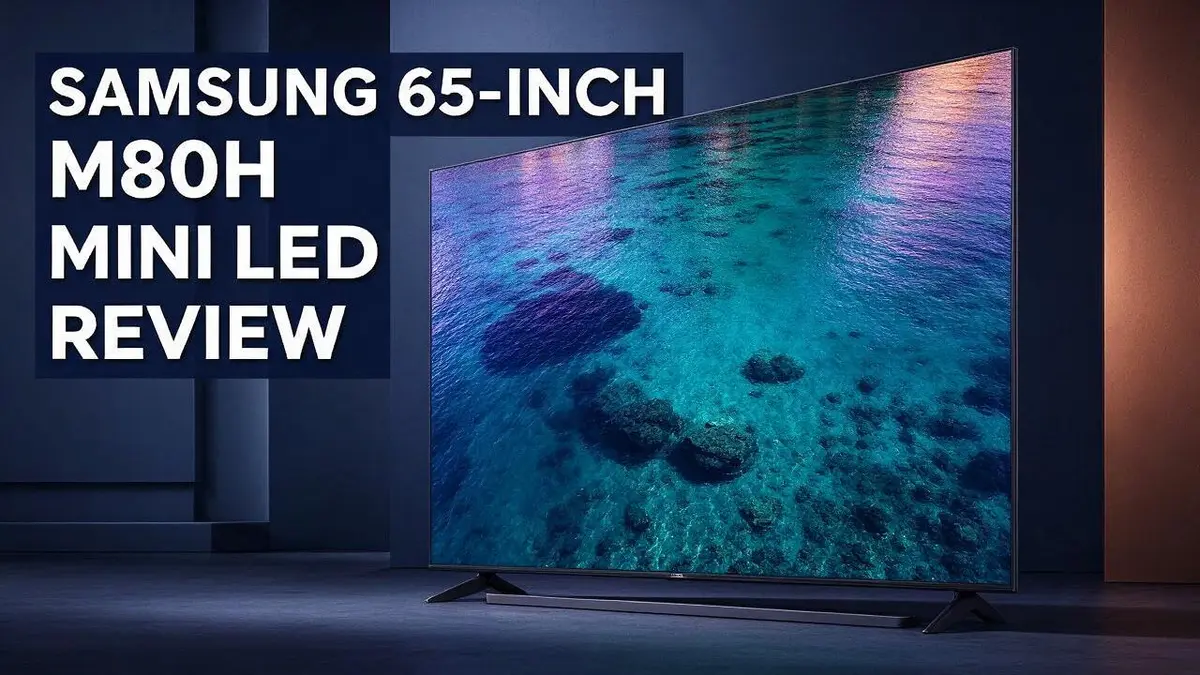
Looking for a TV that makes movies and games look sharp? The Samsung 65 inch M80H Mini LED might be the one. It brings a bright, colorful picture to your living room.
Mini LED technology lights the screen with tiny LEDs. This helps deliver richer contrast and bold details. Reviewers often praise the picture and sound quality.
Gamers will enjoy the 144Hz refresh rate and Motion Xcelerator. Movie fans get Pure Spectrum Color and Auto HDR Remastering. The NQ4 AI Gen2 processor also upscales lower quality content to 4K.
Setup feels simple too. The Tizen menu loads quickly, and Alexa is built in. In this guide, we explore the key features and who this TV suits best.
In a Nutshell
-
Bright picture with rich contrast: The M80H produces bright images with deep, detailed contrast. Dark movie scenes look clear instead of washed out.
-
Great sound for the size: Reviewers often praise the audio quality. You may not need a separate soundbar for everyday shows and movies.
-
Sharper images from AI upscaling: The NQ4 AI Gen2 processor upgrades lower resolution content to 4K. Older shows and streaming clips look cleaner on screen.
-
Easy voice control: Alexa is built in, so you can ask for shows, change channels, or check the weather without picking up a remote.
-
Helpful HDR support: Auto HDR Remastering adds HDR effects to standard content. Colors look richer across many different sources, which helps older videos feel fresh.
-
Mixed owner feedback: Some Reddit users share mixed opinions. Read recent reviews and compare it with options like the TCL Q6CS before you decide.
Picture Quality and Brightness

- MINI LED PROCESSOR 4K: Our advanced processor delivers brighter highlights and deeper blacks,* bringing every...
- PURE COLOR SPECTRUM: delivers one billion true-to-life colors, powered by advanced color technology and...
- MINI LED HDR: Experience HDR picture quality with brighter highlights and deeper blacks than traditional HDR...
Last update on 2026-09-18 / Affiliate links / Images from Amazon Product Advertising API
Picture quality shapes how much you enjoy any TV every day. The Samsung 65 inch M80H aims to deliver vivid images in busy living rooms.
Pure Spectrum Color helps colors look natural and rich. Reds, greens, and blues stand out without looking washed out.
Brightness matters just as much as color. Many people watch TV during the day, when sunlight fills the room. A bright panel keeps scenes clear even with window light nearby.
The 4K UHD resolution adds fine detail to every frame. Faces, fabric textures, and landscapes look crisp from the couch.
Room lighting changes how the picture looks. Bright rooms need strong brightness, while dim rooms reveal deeper shadows. Small changes in your setup can make a big difference.
Dark scenes test any screen. Night scenes in movies show whether shadows stay clear or turn into muddy blocks. Watch these moments closely during your first test.
Picture modes give you more control over the image. Standard and movie modes suit most viewers, while brighter presets work well for sports.
Try a few settings during the first week. Pick the one that looks most natural to your eyes, not the one that looks loudest in a store.
Natural color also makes long viewing sessions easier. A balanced image with clear contrast feels comfortable after hours of watching.
Lighting placement matters too. Position the TV away from direct glare from windows. Soft lamps behind the screen can reduce eye strain.
Finally, think about your favorite shows. Pick a scene you know well and watch it on the TV. Familiar content makes it easy to spot changes in color and brightness.
Good picture quality should feel natural, not forced. Trust your eyes and take your time with the settings.
Gaming and Motion Performance
Gamers want a screen that keeps up with fast action. The M80H aims to deliver smooth play across many game types. Here is what you can expect from its motion handling.
Quick scenes stay easy to follow. When a shooter pans across a map or a racer takes a sharp turn, the picture should hold its shape. Good motion handling keeps enemies, cars, and crosshairs readable.
Variable refresh rate helps smooth frame changes. Many consoles and gaming PCs shift frame rates during heavy scenes. Variable refresh rate matches the screen to those changes, so the image feels less choppy.
Your console connection matters. Connect your console to a suitable input and check its signal settings. The set offers four audio and video inputs, so you can keep a console and a PC connected at once.
Game mode can reduce delay. Turn on game mode before you play fast titles. Many TVs use this mode to cut extra image processing, which helps controls feel more direct.
Competitive players care about response time. Each button press should appear on screen quickly. A low delay display helps you react during tight moments, such as a final round or a close race finish.
Try different game genres. Racing games show motion clearly, while role playing games highlight color and detail. Sports games test how well the screen handles fast balls and crowds. Each type shows a different side of the picture. Choose the mode that feels right for each game type.
Test settings during play. Adjust brightness after a few matches. Small changes can make a big difference in dark dungeons or bright outdoor maps.
Find the right viewing distance. Many players sit about six to eight feet from a screen this size. That spacing fills your view without causing eye strain during long sessions. Comfort matters just as much as picture quality.
Gaming on a large screen feels exciting. The M80H gives many players a sharp, smooth view that suits quick action and relaxed adventures. Check the settings often so your games look their best.
Sound, Smart Features and Setup
Setting up the M80H starts with a simple connection to your home network. Choose your wireless network during the first launch. A stable link helps apps load quickly and keeps streaming smooth.
Tizen OS keeps the home screen clean and easy to read. Your favorite apps sit in one row, so you find them fast. You can rearrange them in seconds.
Sign in to your streaming accounts once. The TV remembers your details, so you can jump straight into your shows.
Bluetooth opens up more listening options. You can pair wireless headphones for late night viewing. Pairing takes only a few seconds in the sound menu. Nearby family members can rest while you watch.
The TV also works with external speakers. Connect a soundbar or receiver through the available inputs to build a larger audio setup. This gives movies and sports a fuller feel.
Check the menu for hidden helpers. The settings menu includes sound modes that adjust output for movies, news, or music. Try each mode during a show. You can save the one that feels best for your room.
Keep the software updated. Samsung releases updates that add features and fix bugs. Turn on automatic updates in the settings menu so you never miss a change.
Use the USB port for quick media. Plug in a flash drive filled with family photos or home videos. The TV plays many common file types directly from the drive. Big screen memories feel special.
Label your inputs to stay organized. Rename each HDMI input to match the device, such as “Game Console” or “Streaming Stick.” Switching sources becomes quicker and less confusing.
A tidy setup starts with cable planning. Fewer cables mean less clutter behind the stand. Plan where each device sits before you mount the set on a wall.
Finish with a quick test. Play a short clip, check the sound from each speaker option, and adjust the picture settings. Then restart the TV once to confirm every setting stays saved. Small tweaks now save frustration later.
Top 3 Alternatives
Looking for a different screen? The Samsung M80H is a solid pick, but these three options also deliver great picture quality for movies, sports, and gaming.
Hisense U8K

- MINILED PRO WITH UP TO 5000 NITS PEAK BRIGHTNESS AND UP TO 5600 LOCAL DIMMING ZONES: See the realism of every...
- HI-VIEW AI ENGINE PRO: Enjoy the game from home, but feel like you’re there. Powered by the Hisense...
- NATIVE 165HZ PANEL WITH GAME BOOSTER 288: Turbo power your gaming! The Native 165Hz Panel has a Variable...

Last update on 2026-09-30 / Affiliate links / Images from Amazon Product Advertising API
The Hisense U8K uses a bright mini LED panel. It makes HDR scenes pop with deep blacks and vivid colors. This model suits living rooms with lots of daylight because it stays bright in busy spaces.
Gamers will like its smooth motion and responsive feel. Google TV also keeps streaming apps easy to find.
TCL QM8

- SQD-Mini LED: As the ultimate Mini LED TV, it integrates the expansive TCL Deep Color System with the...
- TCL Ultra Color Filter: TCL’s Ultra Color Filter with fine 5 nanometer particles (vs. standard 60 nanometer...
- High Static Contrast: Experience exceptional picture quality driven by a high 7000:1 contrast ratio for...
Last update on 2026-09-13 / Affiliate links / Images from Amazon Product Advertising API
The TCL QM8 combines quantum dot color with mini LED backlighting. Colors look rich and natural across most scenes. Skin tones appear warm and realistic.
Its strong contrast helps movies look dramatic at night. The built-in Google TV platform makes browsing simple for the whole family.
LG QNED evo

- DYNAMIC QNED COLOR PRO: Provides a full range of colors for a vibrant, crisp and accurate picture even in the...
- MiniLED: Mini LEDs create picture accuracy for brighter highlights and deeper blacks.
- A8 AI PROCESSOR 4K GEN3: Enjoy outstanding picture, which uses AI to detect what you're watching and...
Last update on 2026-09-05 / Affiliate links / Images from Amazon Product Advertising API
The LG QNED evo focuses on balanced brightness and wide viewing angles. Friends sitting off to the side still see clear, accurate images. This helps during movie nights with a big group.
Its webOS interface feels fast and clean. Families who want an easy setup will find it simple to use from day one.
Value for Money
The 65 inch screen gives you a big stage for movies, sports, and game nights. Many useful features come packed into one set.
Motion Xcelerator and the 144Hz refresh rate keep fast sports and action scenes smooth. Fast moving players and cars stay clear on screen.
The NQ4 AI Gen2 processor upscales lower resolution shows to sharper 4K detail. Older cable channels and DVDs gain more clarity on a large panel.
Auto HDR Remastering adds more depth to standard content. Old favorite shows can look fresh again without any extra setup.
Alexa built in lets you control the TV with your voice. You can search for a title, adjust the volume, or check the weather from your couch. Hands free control is handy when your hands are full.
Four audio and video inputs give you room for a game console, cable box, soundbar, and streaming device at once. Fewer switches between inputs make daily use simpler.
Shoppers comparing the M80H with smaller sets like the 43 inch M71H or the 55 inch TCL Q6CS often notice the extra screen size first. A bigger panel changes how movies feel, and this model offers that step up in one package.
Good features should save you time, not add stress. The M80H aims to do that with quick menus, clear picture tools, and simple daily controls.
Who gets the most from this set? Families who watch together, gamers who want smooth motion, and movie fans who enjoy big screens.
Think about your room size and viewing habits first. A 65 inch screen fits best in a living room where you sit a few steps back.
Long term owners gain the most from this mix of features. A set with many useful tools stays relevant for more of your favorite shows and games.
Overall, the M80H packs strong picture tools, handy smart features, and a big screen into one set. It suits people who want more from their main TV.
Pros and Cons
Pros
– Bright picture with richer contrast for daytime and evening viewing
– Reviewers often praise the picture and sound together
– The menus feel quick and easy for first time setup
– Gaming focused HDMI ports support the 144Hz refresh rate
– Built for both gaming and movie nights
Cons
– Public sources name few specific technical drawbacks
– Some Reddit users are not fully convinced by it
– The 65 inch size needs plenty of wall or stand space
– One USB port may feel tight if you use many devices
Who Should Buy It
The Samsung M80H suits many homes. Still, it fits some viewers better than others. Use this guide to see if it matches your life.
Families with mixed tastes often feel at home with this set. One person may want kids shows, while another wants a late sports game. The screen handles both without fuss.
Upgraders will notice the change right away. If your current TV is old, the jump feels large. You get a fresh start with modern features.
Cord cutters are a strong match too. Most of your shows will come through streaming apps. The apps live right on the TV, so you do not need an extra box.
Roommates and couples who share one living room can also agree on it. The large screen works well when several people sit down together. Everyone can pick a favorite show without arguing.
Some people use their main TV for work calls and training videos. This set handles those tasks with clean, sharp visuals.
Long gaming sessions also feel comfortable on a screen this size. Many players like the feel of a wide view. Your view fills more of the frame, so you stay focused on the action.
Renters who move often should plan ahead. A set this large takes care when packing and carrying. Ask a friend to help on moving day.
Who should look elsewhere? People who need a small screen for a bedroom or desk will find this model too large. A smaller set fits those spaces better.
Buyers who want a simple setup will feel happy with this one. Still, measure your wall or stand before you commit. That quick check helps you avoid surprises.
If you care most about one specific look, compare a few options first. Take time to see how each screen matches your taste.
Final Verdict
The Samsung 65 Inch M80H earns a confident recommendation from us. It pairs a large Mini LED panel with modern features that feel current.
Pure Spectrum Color gives colors a natural look. Reds, greens, and blues appear rich without looking harsh.
Samsung Vision AI brings the smart side together in one place. You spend less time hunting for settings and more time watching.
Mini LED backlighting works behind the screen in many small zones. This design helps the picture keep strong contrast when you watch in a bright room.
Your room matters more than you think. Check how much window light hits the screen during the day. Strong sunlight can wash out even a great picture.
Measure your wall before you order. Compare the screen width with your sofa and cabinet. A quick tape measure check can save you a return.
Viewing distance also shapes the experience. Sitting too close can feel overwhelming, while sitting too far can hide fine detail.
Plan the placement of your router too. A strong wireless signal keeps streaming smooth on a screen this large.
Think about the sound setup as well. If the built in speakers feel thin in a big room, a separate sound system can fill the gaps.
Who gets the most from this set? The best fit is someone who wants one screen for almost everything.
Households that switch between films, sports, and games often feel the benefit most.
The M80H rewards careful planning. Set it up in a spot that suits your daily routine, and it can become the center of your home.
Long term, a set like this can serve you for years. Keep the software updated so new features arrive over time.
Take your time comparing models before you decide. Look closely at how each screen fits your daily habits.
Our final call is simple: this is a smart pick for a bright, big screen upgrade.
Frequently Asked Questions
Does the Samsung M80H support HDR content?
Yes, it supports HDR. The set also uses Auto HDR Remastering, so regular shows gain extra depth. Your older favorites can look fresh too.
Will the M80H handle fast sports and action scenes?
It does. The Motion Xcelerator feature and 144Hz refresh rate keep fast movement clear. Your game console or PC must also send a 144Hz signal to use the full speed.
Can I control the TV with my voice?
Yes. Alexa is built in, so you can search for shows, adjust volume, or open apps without reaching for the remote. Tizen OS keeps these voice commands simple to use.
How does the NQ4 AI Gen2 processor help older videos?
The NQ4 AI Gen2 processor adds 4K AI upscaling. It sharpens lower resolution shows so they fill the screen with more detail. This helps older movies and cable channels look cleaner.
Is there a smaller Samsung Mini LED model?
Yes. The Samsung M71H comes in a 43 inch size. It suits a bedroom or desk where the 65 inch model feels too large. The TCL Q6CS offers a 55 inch option if you want something in between.

Tian is a passionate technology enthusiast and reviewer who explores the latest in AI tools, gadgets, and digital innovations to help readers make informed tech decisions.