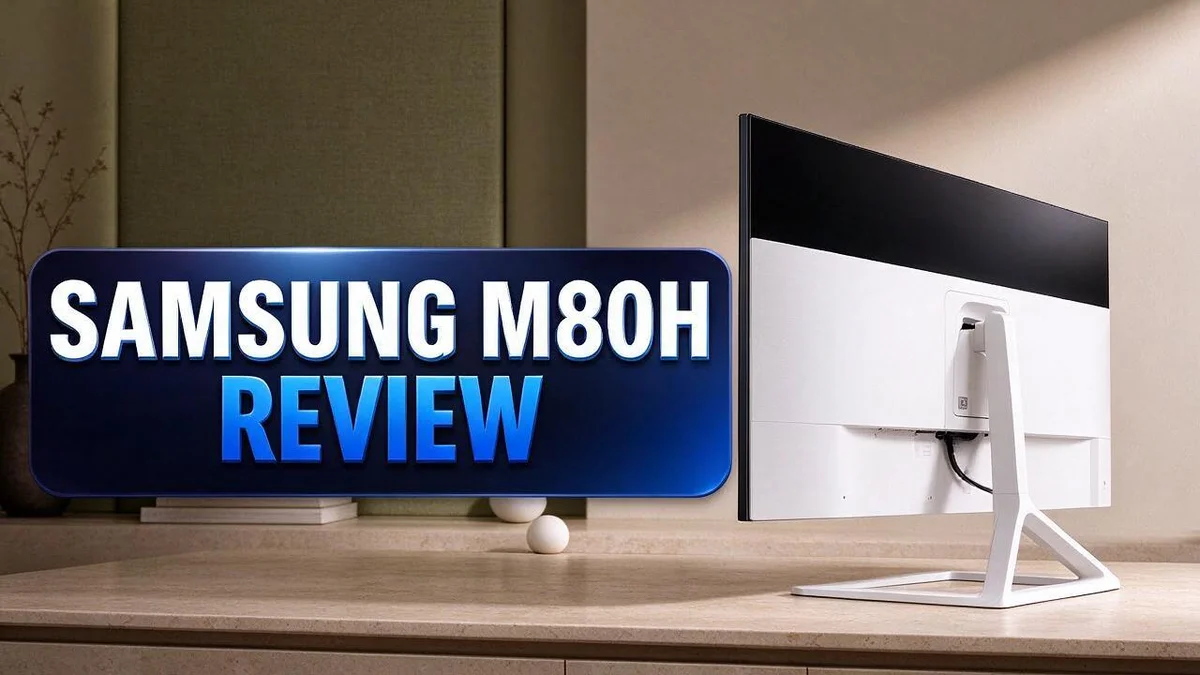
Samsung M80H Review: Mini LED 4K Gaming TV Performance, Features and Comparisons
Searching for a TV that keeps up with fast games? The Samsung M80H could be a strong choice. This 2026 model blends Mini LED screen technology with useful gaming features.
The screen shows 4K UHD resolution with sharp detail. It also supports HDR10+ and HLG, so colors and highlights look rich on screen.
Gamers will appreciate the 144Hz variable refresh rate. Support for AMD FreeSync Premium, Nvidia compatibility, and ALLM helps keep motion smooth. HDMI 2.1 also prepares your setup for newer consoles.
Is this model right for your living room? In this guide, we break down the key specs, pros, cons, and top rivals. You will know if it fits your needs by the end.
In a Nutshell
-
Sizes fit most living rooms: Shoppers can pick a 55″, 65″, 75″, or 85″ screen. Small apartments and large family rooms both have a good option.
-
Bright Mini LED panel: The direct lit Mini LED design gives the screen extra brightness. This helps during daytime viewing in rooms with plenty of natural light.
-
Console ready connections: HDMI 2.1 ports let players connect modern consoles and gaming PCs. This keeps the setup ready for the latest gaming gear.
-
Smart gaming perks: Auto low latency mode switches on when a game starts. FreeSync Premium and G-Sync Compatible support help reduce screen tearing during fast action.
-
A trade off to know: Dark scenes can look washed out because the TV lacks local dimming. Movie fans who want deep blacks should compare other models first.
-
Great for everyday viewing: Streaming shows, news, sports, and family game nights look solid on this set. It suits people who watch mostly in lit living rooms.
Picture Quality and HDR Performance

- MINI LED WITH AI MODE: Mini LED with AI Mode combines compact, high-efficiency Mini LEDs with intelligent...
- MOTION XCELERATOR 144HZ: Get the edge in fast-paced games and sports with ultra-smooth 144Hz performance...
- PURE SPECTRUM COLOR: Pure Color Spectrum delivers one billion true-to-life colors, powered by advanced color...

Last update on 2026-09-13 / Affiliate links / Images from Amazon Product Advertising API
HDR10+ support helps this TV show bright highlights and rich color. Movies and shows with HDR10+ often look more lifelike than standard footage.
The M80H also supports HLG, a format used for many live broadcasts. Sports and news can look clear when the signal uses this standard.
The NQ4 AI Gen2 processor works behind the scenes. It helps adjust contrast and color so faces look natural and skies look smooth.
Older shows also gain from the 4K panel. The processor fills in extra detail, so standard HD content looks sharper than expected.
Mini LED backlighting also helps bright colors pop in sunny scenes. Bold reds and greens can look vivid when the picture needs energy.
Color accuracy could be another strong point for this model. Skin tones look warm and natural in most movies and shows.
Mixed scenes test any TV. A bright sky next to a dark forest is hard to show well on this set.
Picture mode settings matter. Choose Movie mode for a natural look. Use the HDR setting when you play HDR content so the TV uses the full range.
Room light also affects what you see. Bright windows can wash out the picture, so closing blinds helps HDR content look its best.
Viewing distance changes how the picture feels. Sit at a comfortable distance so the picture fills your view without strain.
Try a few favorite scenes before you settle on final settings. Small changes to brightness and color can make a big difference.
Test HDR content with a movie you know well. Familiar scenes make it easier to spot whether colors look too bright or too dull. Choose scenes that mix bright and dark areas.
Final verdict on the picture: the M80H offers solid HDR support for everyday viewing. Mixed lighting is where it shows its limits.
Gaming Features and Refresh Rate
Fast games need a screen that keeps pace. Refresh rate is the number of new frames a screen shows each second. More frames mean smoother motion in racing and shooter games.
Variable refresh rate does much of the heavy lifting. Instead of forcing the TV to run at one fixed speed, the screen adjusts to match the frames your console or PC sends.
This matters because uneven frame rates can cause screen tearing. Tearing looks like a split line running across the picture during quick camera pans.
Stutter is another common problem. It shows up as small hitches when frames arrive late. Matching the screen speed to the game helps smooth out those bumps.
FreeSync Premium and G-Sync Compatible both aim at this goal. Nvidia graphics cards can use G-Sync Compatible, while AMD graphics cards can use FreeSync.
Setup takes a few simple steps. Turn on the game mode option in the picture menu. Then find the VRR setting in your console or PC display options and switch it on.
Frame rate also plays a role. Many consoles output up to 120Hz, so a 144Hz panel may not run at its peak speed on every device. Games locked at 60 frames per second still look smoother than on a standard TV.
PC players have the most room to push this screen. A capable graphics card can produce higher frame rates, letting the 144Hz panel shine in competitive titles.
Quick response matters just as much as smooth motion. When the screen handles frames quickly, button presses feel direct and controls feel tight.
Test a few games before you settle on final settings. Fast action, slow exploration, and menu screens each show different results. Keep notes on what feels best for your play style.
Overall, these gaming features give fast titles a steady, fluid look. Players who want smooth motion on a big screen will find plenty to like here.
Connectivity and HDMI 2.1 Ports
Every good TV needs a steady link to the devices you use. This set offers a clear way to handle that. Your cable box, streaming stick, and game console all need a place to plug in.
Check the back panel first. Label each port with the device it serves. This small step saves time later and keeps your setup neat.
Why the port type matters: Not every HDMI cable carries the same signal. For the fastest speeds, use a cable rated for Ultra High Speed HDMI. Older cables may limit high refresh rates or 4K signals at full quality.
HDMI 2.1 gives the set room to grow. Newer consoles and PCs can send higher frame rates and richer signals. Using these ports now means less upgrading later.
Think about how many devices you plan to connect. A soundbar, a console, a streaming box, and a PC can fill ports quickly. Plan your layout before you mount the set on a wall.
Ports on the back can be hard to reach. Set up your cables before you mount the TV. This saves you from awkward reaching later.
Cable length also counts. Measure the path from each device to the TV. Leave a little slack so you can move the set without strain on the plugs.
Good cable habits: Use a cable with a clean, tight connector. Loose plugs can drop the signal during play. Push each end in firmly until it clicks into place.
Source devices need the right settings too. Turn on the highest output in the console menu. Choose the correct resolution in your PC display settings. The TV can only show what it receives.
Some people use a switch box to add more inputs. Keep the box simple and use only a few devices. Too many middle steps can cause signal problems.
Pro tip: Power cycle your devices after you change cables. Turn off the TV, console, and receiver, then start them again in order. This often clears a stuck handshake.
Wireless options can help with streaming apps. Built in apps need a stable home network. Wired Ethernet gives the most reliable result when you stream high quality video. Keep the router close or use a strong signal boost.
Top 3 Alternatives
Looking for a different screen? These three options may suit your needs better.
Samsung M8 Smart Monitor

- 32" 4K UHD VA Display: 3840 x 2160 resolution, HDR10+, 60Hz refresh rate, 4ms response time, and...
- Samsung Vision AI: NQM AI Processor powers 4K AI Upscaling and AI Picture Optimizer for enhanced streaming and...
- Smart TV & Gaming: Access Smart TV apps, Samsung TV Plus, Gaming Hub, AirPlay, Wi-Fi, and Bluetooth without a...
Last update on 2026-11-07 / Affiliate links / Images from Amazon Product Advertising API
The Samsung M8 Smart Monitor works as a monitor and a TV in one device. Built-in streaming apps let you watch shows without a separate box. It also works well as a second screen for calls and light office tasks.
LG 27MP400

- Full HD Monitor - Enjoy gaming, movies, shows and videos in Full High Definition. LG's FHD Monitors present...
- 75Hz Refresh Rate - Stream like you’re the only one watching with an ultra-fast 75Hz refresh rate.
- Wall Mountable - Running low on desk space? Mount the 27” FHD IPS Monitor for easy viewing.
Last update on 2026-11-07 / Affiliate links / Images from Amazon Product Advertising API
The LG 27MP400 keeps things simple. It is a 27-inch Full HD monitor with an IPS panel. Colors look bright from almost any angle. It supports AMD FreeSync, which helps reduce screen tearing during games.
Dell S2722QC

- Low blue light: The improved ComfortView Plus reduces harmful blue light emissions to ≤35%, for all-day...
- Refresh rate: A smooth, tear-free experience with AMD FreeSync Premium (refresh rate up to 120Hz) and an...
- Vivid colors: Immerse yourself in breathtaking 4K visuals with in-plane switching technology. Enjoy vibrant...
Last update on 2026-11-07 / Affiliate links / Images from Amazon Product Advertising API
The Dell S2722QC offers a sharper picture. It has a 27-inch 4K UHD display, so text looks crisp and photos show fine detail. Its thin borders also suit dual screen setups.
Choose the option that fits your daily routine best.
Sizes, Design and Setup
The Samsung M80H comes in four sizes: 55, 65, 75, and 85 inches. Picking the right one starts with your room. Measure the wall or stand space before you buy.
A 55 inch screen fits a bedroom or a small living room well. A 65 inch model suits most average family rooms. Larger sizes like 75 or 85 inches work best for open spaces and bold home theater setups.
Bigger is not always better, though. A huge screen in a small room can feel overwhelming. Stand where you sit most often. Look at how much of the wall the screen covers.
The design looks clean and modern. The panel stays about 3 inches deep, so it sits close to the wall. Slim lines suit most living rooms and blend with modern furniture.
You can use the included stand or mount the set on a wall. A stand needs a flat surface that fits the screen width. Wall mounting needs a bracket that matches the pattern on the back panel. Check that pattern first.
Setup takes less time than you might think. Start by placing the TV on a soft surface. Attach the stand using the included parts. Two people should lift larger sizes.
Next, plug in the power cable and press the power button. Follow the steps on the screen to choose your language. Connect to your home network and sign in to your account.
Install any software update the set finds. Updates bring fixes and new features. Let the update finish before you change other settings.
Leave a few inches of space behind the set for airflow. Use cable clips to hide cords behind the stand. Keep the screen away from heavy items that could fall on it.
Take your time with the first setup. A careful start makes the rest of your viewing smoother.
Pros and Cons
Pros
- A Mini LED panel makes colors look bright and lively.
- 4K resolution shows sharp detail in movies and sports.
- HDR10+ adds deeper contrast in supported shows.
- HLG support helps with live broadcast HDR content.
- The NQ4 AI Gen2 processor helps clean up lower quality video.
Cons
- Local dimming is missing, so the screen cannot dim zones separately.
- Dark scenes can look washed out and gray.
- Highlights may look less striking than on some rivals.
- The Sony BRAVIA 2 II offers Google TV built in.
Who Should Buy It
The Samsung M80H suits a wide range of viewers. Still, some people will get more from it than others. Here is a closer look at who should buy it.
Gamers top the list. If you play on a console or gaming PC, this set fits your setup. Fast action games feel smooth, and the gaming features do much of the work for you.
Console players can connect a PlayStation or Xbox and start quickly. The set reacts well when you switch between games and menus.
Families with a spare room can benefit too. This set works well for a game room or a kids’ bedroom.
Parents may like the simple layout for shared viewing. Everyone in the house can find cartoons, movies, and sports without a long learning curve.
People buying their first big TV often want a simple start. This model lets you focus on watching rather than tinkering.
A first big screen can feel exciting. This set gives a strong start without asking for complicated choices.
Anyone leaving an older flat screen will see a clear step up. The overall look feels fresher and more modern.
Viewers who watch mostly in bright rooms get the most from this panel. Daytime shows and casual viewing look lively when sunlight fills the room.
Rooms with large windows are a good match. Glare may still appear in strong sun, so place the set away from direct light.
Movie lovers who watch in dark rooms may want to look elsewhere. Buyers who want deep black levels for film nights should compare other models first. Other sets may fit those needs more closely.
In short, this TV fits gamers, families, and everyday viewers. Check your room and viewing habits before you decide.
Think about your daily routine too. A screen that matches how you live will feel better every day than one chosen only for its specs.
Final Verdict
Our final take on the Samsung M80H is positive, with a few clear conditions. It works best for people who want modern gaming features on a large, clean-looking screen.
The 144Hz refresh rate stands out for a set in this group. HDMI 2.1 also gives the panel room to grow with newer consoles and PCs.
Think about what you need most before you buy. A TV is a daily tool, so match it to your habits.
Pick the Samsung M80H if smooth motion matters more than built-in apps. Gamers who stream through their own console can skip the extra platform features.
The Sony BRAVIA 2 II fits a different need. It offers Google TV and Sony picture processing, which many viewers prefer for daily streaming and cleaner image handling.
The Samsung M70H and TCL P8L also deserve a look. Compare how each panel handles your favorite shows before you decide.
Look at the room first. Note where the windows sit and how much light reaches the screen during the evening.
Seating distance matters too. A 55 inch set suits closer seating, while larger sizes work better for bigger rooms and longer viewing distances.
Measure your wall or stand space before you order. Include the width of the stand base so the set fits neatly.
Think about your streaming habits too. If you use several apps every day, the Sony model may feel easier to manage.
Confirm that your soundbar or receiver connects through HDMI ARC. This link keeps audio simple and clear.
A set with HDMI 2.1 can handle newer devices, so it may stay useful for years. Plan for the next few years of upgrades, not just today.
Read recent reviews and ask friends who own similar models. Real owner feedback often reveals small details that spec sheets miss.
Overall, the Samsung M80H earns a recommendation for gamers and families who want a bright, sharp screen. It is not the best pick for every room or every movie fan. Weigh the compromises, compare your options, and choose the set that fits your daily life.
Frequently Asked Questions
What sizes does the Samsung M80H come in?
The M80H comes in four sizes: 55, 65, 75, and 85 inches. A 55-inch screen fits smaller rooms well. The 85-inch model suits big living rooms where people sit farther back.
Does the M80H work with AMD or Nvidia graphics cards?
Yes, it supports AMD FreeSync Premium and Nvidia G-Sync Compatible. These features help keep fast action smooth when you play on a gaming PC. Turn on the matching setting in your graphics card software for the best results.
How thick is the M80H?
The panel sits about 3 inches deep. That is a bit thicker than very slim TVs. Check your wall space and mount type before you hang it on the wall.
Why does HDMI 2.1 matter on this TV?
HDMI 2.1 ports let newer consoles and PCs send fast video signals. Use a cable that supports HDMI 2.1 so you get the full benefit. Older cables may limit the signal, so check the label before you connect.
Is the M80H a new model?
Yes, it is a 2026 model. Newer sets usually bring updated processors and features. This makes it a current choice in the Samsung lineup.

Tian is a passionate technology enthusiast and reviewer who explores the latest in AI tools, gadgets, and digital innovations to help readers make informed tech decisions.