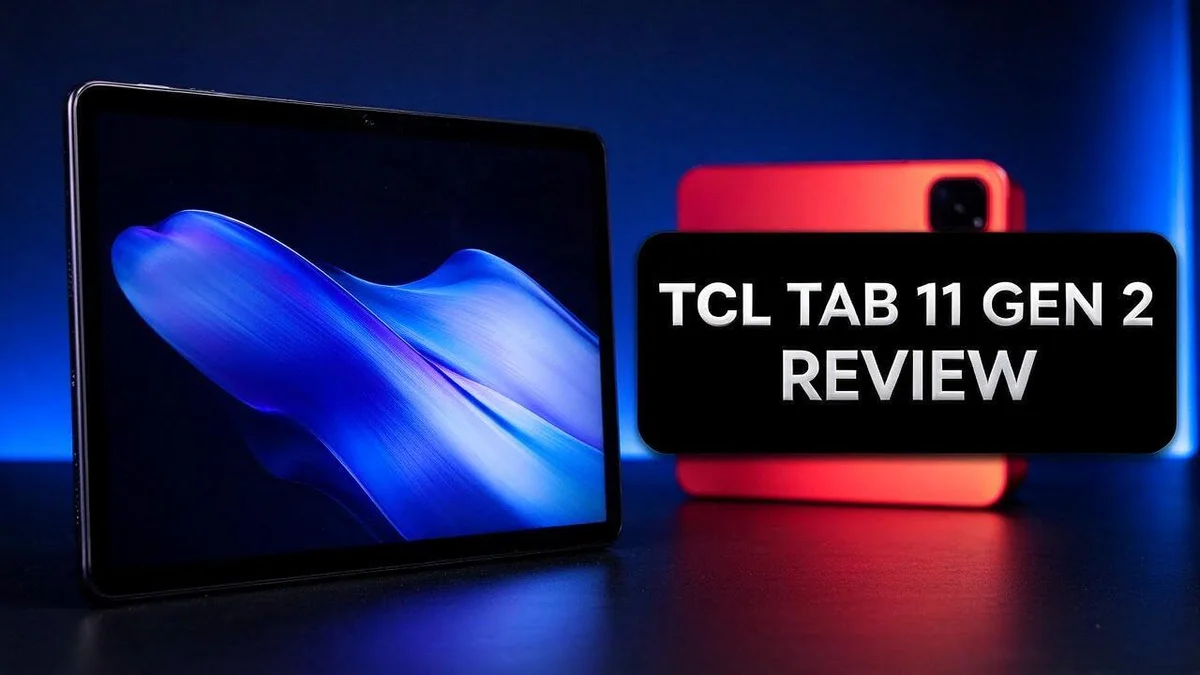
TCL Tab 11 Gen 2 Review: Display, Performance, Stylus, Battery and Verdict
Thinking about a new tablet for reading, streaming, or taking notes? The TCL Tab 11 Gen 2 could be a smart pick.
This tablet offers an 11 inch display and a MediaTek Helio G80 processor. It also includes an 8000mAh battery for long days.
Storage is a major highlight. You get 256GB of space plus 6GB of expansion memory.
The NXTPAPER version filters 61% more blue light, so your eyes may feel less strain during long reading sessions.
Reviewers often praise its thin, light build. However, pen use feels weak, and palm rejection can be hit or miss.
This guide covers the specs, strengths, and drawbacks. Keep reading to see if this tablet fits your needs.
In a Nutshell
The TCL Tab 11 Gen 2 suits people who want a simple tablet for daily tasks. It handles reading, video, and light note taking at home.
- Long battery life: An 8000mAh battery keeps the tablet running through long reading sessions and movie nights.
- Extra memory boost: It offers 6GB of RAM plus 6GB of expansion, so switching between apps feels more fluid.
- Stylus limits: Pen use is poor, so this tablet works better for typing and reading than for detailed handwriting.
- Palm rejection issues: Some users report that palm rejection is weak, so resting your hand lightly on the screen helps.
- Strong rivals: Top alternatives include the TCL Tab A1 Plus, Lenovo Idea Tab, and Samsung Galaxy Tab A11+.
- Best fit: This model suits readers, streamers, and casual note takers who want a light tablet for everyday use.
Overall, the tablet works well for relaxed everyday use. Check the pen and palm rejection limits first if you plan to write often.
Display and Blue-Light Filtering

- Tablet, Drawing Pad, and Digital Notebook – All in One: Whether you’re an artist, student, professional...
- NXTPAPER 4.0 Display for Enhanced Eye Comfort: Featuring upgraded NXTPAPER 4.0 display technology, it offers...
- AI-Powered Productivity & Communication: The TCL NXTPAPER 11 Gen 2 is equipped with a smart voice memo...

Last update on 2026-11-07 / Affiliate links / Images from Amazon Product Advertising API
Screen quality often decides whether a tablet feels pleasant to use. The TCL Tab 11 Gen 2 pairs its display with smart settings. These settings adjust to your surroundings. Let’s look at how they work.
The NXTPAPER version includes Adaptive Brightness and Adaptive Color. Adaptive brightness changes the screen level based on the light around you. Adaptive color keeps the picture natural as lighting shifts.
Think about where you read most often. A bedside table at night needs a softer glow than a sunny kitchen counter. Light sensors help the screen respond without extra effort. Automatic adjustments save you from constant manual tweaks.
Blue light filtering works best when it fits your routine. Try using the filter in the evening and keep the screen brighter during the day. This simple habit can make the device feel more comfortable over time.
Many people use tablets for ebooks, news sites, and comics. Text clarity matters most in those apps. Adjust font size and line spacing in your reading app to suit your eyes.
The screen also works well for video calls and shows. Propping the tablet on a stand keeps the picture at eye level. This position can reduce neck strain during long sessions.
Explore the display menu for filter controls and timing options. Set a schedule so the filter turns on by itself. This saves you from remembering to switch it on each night.
Results differ from person to person. Some users notice the change right away. Others need a few days to adjust. Keep notes on how your eyes feel after each session. Give the settings a fair test before you decide.
Your daily habits should guide the final choice. Reading lovers will likely value these display features most. Test the screen in person whenever possible.
Performance and Storage
Performance shapes how a tablet feels every day. The MediaTek Helio G80 handles everyday work with ease. It supports browsing, reading, and video apps without much fuss.
Heavy tasks need more power. Demanding games and video editing may feel slow on this chip. Casual games and light apps usually run without trouble.
Storage matters just as much. The 256GB model gives you plenty of room for ebooks, comics, and downloaded shows. Offline movies stay ready for trips and long commutes.
Check the listing before you buy. One source lists 64GB for the NXTPAPER 11 Gen 2, which conflicts with the 256GB figure. Confirm the exact storage size with the seller or product page.
Cloud services help you save device space. Store photos and large files online and keep the tablet free for daily use.
Storage also affects speed when you install new apps. A tablet with more free space usually feels quicker to update. Delete unused files every few months to keep things tidy.
Software updates need room too. Keep a few gigabytes free so updates install without errors. This simple habit keeps the tablet running smoothly.
Multitasking feels smooth for most daily routines. Reading in one app while checking messages in another should feel easy. Many open apps at once may slow things down.
A steady processor also keeps page turns and screen changes quick. This matters most during long reading sessions.
Battery use also depends on performance. Heavy apps drain power faster than reading apps do. Choose lighter apps for longer sessions away from a charger.
Students, readers, and casual users often fit this setup well. Power users who edit video or play demanding titles may want a stronger chip.
Your habits decide whether this tablet fits. Think about the apps you open most each day. Then compare those needs with the specs above.
Stylus and Handwriting
Many buyers want to write notes by hand on a tablet. This section shows what to expect from the pen experience. Think of it as a helper for quick jots, not a full notebook.
Quick notes work best. Short grocery lists, reminders, and a few lines in a note app feel easy to manage. Long essays or detailed sketches may feel slow and less satisfying.
Your note app matters too. Some apps respond better to pen input than others. Try a few options and see which one feels natural to you.
Check the box contents before you buy. Pen details can vary, so look at the product listing to see whether a stylus is included. This helps you plan your budget for accessories and avoid surprises.
Compatibility is another question. Not every pen from another brand works the same way on every tablet. Look for a pen that clearly states it works with Android tablets.
A screen protector can change the feel of writing. Some protectors add a texture that feels closer to paper. Others feel smooth and slick. If you can, test a sample before you commit.
Practice builds comfort. Hold the pen lightly and write in slow, steady strokes. Many people find their handwriting looks neater when they slow down.
Marking up documents often works well here. Simple highlights and short comments are easy to add to PDFs. Choose a pen with a fine tip to keep your lines clear.
Match your expectations to your needs. This tablet suits people who want light note taking and occasional markup. If you need professional level drawing, a dedicated device may serve you better.
Top 3 Alternatives
Samsung Galaxy Tab A9+

- ATTENTION: this is the WIFI ONLY model
- Packaging contains the cell phone, a USB C to USB C cable, and a sim tray ejector tool. Seller provides a USB...
- Display: TFT LCD | 8.7 inches, 214.9 cm2 (~81.7% screen-to-body ratio) | 800 x 1340 pixels, 5:3 ratio...
Last update on 2026-11-07 / Affiliate links / Images from Amazon Product Advertising API
The Samsung Galaxy Tab A9+ gives you a bright, large screen for streaming shows and video calls. It handles everyday tasks like browsing, reading, and taking notes with ease. Many people like its slim design and long battery life. It also supports multiple user accounts. This makes it a good pick for families who share one device.
Lenovo Tab M11

- MULTITASKING MASTER: The Lenovo Tab M11 combines robust performance with portability in a sleek design and...
- POWER-PACKED PERFORMANCE: Streamline your day with the ability to work or study at home and on the go—the...
- EXPERIENCE VIVID CLARITY: Immerse yourself in vibrant visuals—a 11" 1920x1200 WUXGA display brings your...
Last update on 2026-10-13 / Affiliate links / Images from Amazon Product Advertising API
The Lenovo Tab M11 offers a clear display and solid sound from its speakers. It feels light in your hands and fits easily into a backpack. Students and kids often choose this model for homework, reading, and games. Its storage can grow with a microSD card. This helps when you download lots of apps, photos, or videos.
Amazon Fire Max 11

- Do what you love, uninterrupted — 25% faster performance than the previous generation and is ideal for...
- High-def entertainment — A 10.1" 1080p Full HD display brings brilliant color to all your shows and games...
- Thin, light, durable — Tap into entertainment from anywhere with a lightweight, durable design and...
Last update on 2026-09-14 / Affiliate links / Images from Amazon Product Advertising API
The Amazon Fire Max 11 works well if you already use Alexa devices at home. Its large screen and strong speakers make movies feel fun and immersive. You can add a stylus for notes and sketches. Fire tablets offer easy access to Prime Video and other Amazon apps. Keep in mind that most apps come from the Amazon Appstore, not the Google Play Store.
Build, Weight and Battery Life
The build of the TCL Tab 11 Gen 2 feels clean and simple in the hand. Reviewers of the earlier NXTPAPER 11 described the body as thin, light, and well made. That first impression matters when you hold a tablet every day.
Weight shapes comfort after a long session. A lighter frame helps your wrist relax while you read in bed or on a couch. Holding it with one hand also feels easy for short stretches. The exact weight is not listed here, so check the product listing before you buy.
Grip matters too. A smooth back can slip when your hands feel damp or tired. A soft case adds friction and protects the corners when you set it down.
The tablet packs an 8000mAh battery. That size suits long reading sessions, video shows, and light web browsing. Your results will change with screen level, wireless use, and background apps.
Brightness has the biggest effect on battery life. Lowering the screen level in a dim room often saves more power than any other setting. Keep the screen level comfortable, but avoid running it at maximum all day.
Charging habits also shape daily use. Charging overnight is simple, but try to avoid keeping the battery at full charge for days. Gentle charging can help the battery stay healthy over time.
Background apps drain power quietly. Close games and video apps you no longer use. Turn off syncing for apps that do not need constant updates. Simple habits like these keep the tablet ready for longer days.
Who benefits most from this battery? Readers and students who spend long hours away from a charger will notice the difference most. Heavy gamers may need to charge more often.
Check the listing for exact weight and battery claims before you buy. Real use will show how the tablet fits your routine each day.
Connectivity and Expansion
Memory expansion works differently than storage. The Gen 2 pairs 6GB of RAM with 6GB of expansion memory. This extra space helps the system keep more apps open, but it does not add room for photos or files.
Many buyers mix up these two terms. Storage holds your files, while memory handles active tasks. Keep that difference in mind when you read the spec sheet.
Wireless links matter for daily use. A wireless connection keeps your reading library, video apps, and browser running smoothly. A stable network often matters more than raw tablet speed.
Pairing accessories takes only a few steps. Bluetooth connects headphones, keyboards, and speakers. Turn on pairing mode on the accessory, then choose it from the tablet’s settings list.
Some people want a keyboard for longer writing sessions. A case that includes a keyboard can turn the tablet into a small work station. Test the fit before you commit to one.
Ports and cellular options need a close look. Do not assume every NXTPAPER model shares the same features. Each version can offer different ports and connection choices, so read the details for the exact model you plan to buy.
Home use often depends on network strength more than extra ports. Video calls and streaming need a strong, steady signal. Place your router near the spot where you use the tablet most.
Your daily routine shapes your needs. If you read mostly in bed, a strong wireless signal matters most. If you travel often, a mobile hotspot from your phone can fill gaps when public networks fail.
Make a short list of the devices you plan to use with the tablet. Then confirm that each one pairs without trouble. A quick check now saves frustration later.
Pros and Cons
Pros
– Large internal storage keeps books, files, and videos on hand.
– Blue light filtering eases eye strain during evening reading.
– Reviewers describe the build as thin and well made.
– The 11 inch screen gives documents and notes plenty of room.
– One device can cover reading, notes, and video.
Cons
– Palm rejection is weak, so a resting hand can mark the screen.
– Pen use can feel rough, according to some user reports.
– Listings disagree on storage, so check the exact specs before you buy.
Who Should Buy It
Shoppers who want one simple device for school and home will likely like it. Parents often need a tablet that handles homework, videos, and reading without fuss. This model can cover all three tasks in one place.
Students with heavy reading loads can gain a lot from this screen. Textbooks and PDF notes look clear on the large display. Pages need less zooming, so study sessions feel smoother.
Families who share one tablet should set clear rules early. Kids can watch shows while adults catch up on news or read. Separate user profiles help keep everyone’s apps and files neat.
Commuters who ride trains or buses often prefer a screen this size. It feels roomy compared with a phone. Yet it still slips into most bags without much effort.
Language learners can use it as a daily study partner. Reading lessons, audio clips, and short videos all live in one app-friendly space. Regular practice becomes easier to fit into a busy schedule.
Travelers who want entertainment on long flights may appreciate it. Downloaded movies and e-books can play without a constant connection. Pack a charger anyway, since long trips test any device.
Gamers who want demanding titles should look at stronger hardware. This tablet suits casual games and light apps better than graphics-heavy play.
Office workers who juggle many heavy programs may want more power. Everyday tasks like email, documents, and notes suit this tablet best.
Ask yourself what you do most each day. If reading, note taking, and video top your list, this tablet fits your routine well. Your answers will guide the right choice.
Bottom line: match the tablet to your routine before you commit.
Final Verdict
The TCL Tab 11 Gen 2 makes a strong choice for people who want a calm and focused tablet. Its strengths suit everyday reading, notes, and streaming.
Pen users should think twice. Writing with a stylus can feel rough, and the screen may pick up a resting palm. If sketching or detailed handwriting matters most, try the pen in person first.
Read the listing closely. Storage numbers vary between sellers, so confirm the exact version before you order. Also check which screen finish you want, because the NXTPAPER model looks and feels different from standard panels.
This tablet suits people who value a simple daily setup. Students, readers, and families can all use it without much learning time. The controls stay easy to follow for new users.
Heavy gamers and power multitaskers may want more speed. The processor handles routine apps well, yet demanding games and many open windows may feel slow. Set expectations early so the device meets your needs.
Think about your daily routine first. A reader who spends evenings in bed will value the eye comfort features. A person who writes long notes may prefer a keyboard setup or a different model.
Think about how often you travel. Long flights and train rides reward a tablet that stays comfortable to hold. Pack a charger anyway, since battery life depends on how you use the device.
Overall, this tablet earns a recommendation for the right buyer. It gives you a large, comfortable screen and generous storage. Match it to your habits, test the features that matter most, and you will likely feel satisfied with your choice.
Final tip: compare the top alternatives. Look at the TCL Tab A1 Plus, Lenovo Idea Tab, and Samsung Galaxy Tab A11+ side by side. Note which one matches your must-have features, then decide with confidence.
Frequently Asked Questions
What does the 6GB expansion do?
The tablet pairs 6GB of RAM with 6GB of expansion. The expansion lets the system borrow spare storage to keep more apps open. It does not add true RAM, so heavy multitasking can still feel slower.
Does the battery last a full school day?
The 8000mAh battery gives plenty of power for reading, notes, and video. Real results depend on screen brightness and how you use the device. Lower brightness usually helps the battery last longer.
Is the MediaTek Helio G80 fast enough for daily use?
The Helio G80 handles reading, streaming, and light app use well. Heavy games and many open apps may feel slow. Choose it for calm, simple tasks.
Do the NXTPAPER 11 Plus flaws apply to this model?
No. Complaints about the weak chipset, missing expansion storage, no cellular, and no headphone jack refer to the NXTPAPER 11 Plus. The Gen 2 model does not share those criticisms. Always check the exact model name before you decide.
Which rivals should I compare it with?
Shoppers often compare it with the TCL Tab A1 Plus, Lenovo Idea Tab, TCL Tab 10L Gen 4, Samsung Galaxy Tab A11+, and Microsoft Surface Go 2. Start by comparing screen size, storage, and pen support. Each rival fits a different need.

Tian is a passionate technology enthusiast and reviewer who explores the latest in AI tools, gadgets, and digital innovations to help readers make informed tech decisions.