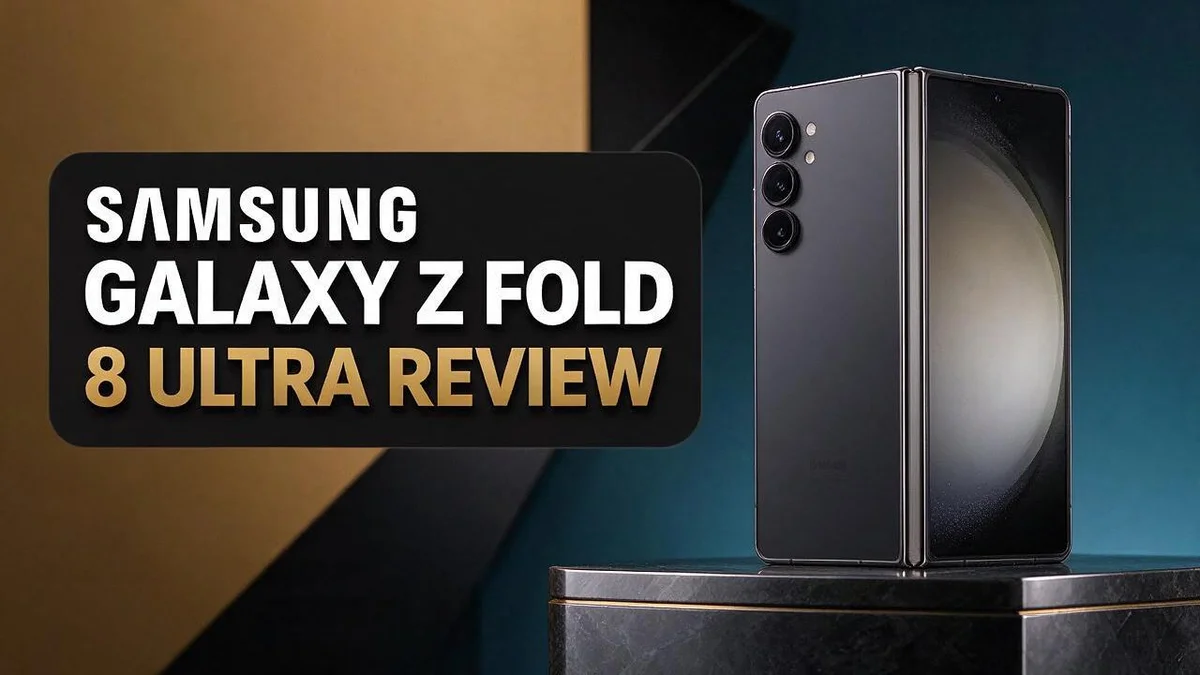
Samsung Galaxy Z Fold 8 Ultra Review: Specs, Cameras, Battery and Verdict
Samsung just raised the bar for foldable phones.
The Galaxy Z Fold 8 Ultra brings faster performance, a longer battery, and sharper cameras.
If you want a big screen that still fits in your pocket, this phone deserves a close look.
Its 8 inch main display gives you plenty of room for video, games, and work.
Three apps can run side by side, so multitasking feels smooth.
The Snapdragon 8 Elite Gen 5 chip keeps everything moving fast.
Camera fans will enjoy the upgraded 50MP ultrawide lens and 8K video recording.
Still, there is no powerful zoom camera and no S Pen support. In this review, we explore whether the Fold 8 Ultra is the right foldable for you.
In a Nutshell
- At just 4.1 mm thick when folded, this phone feels surprisingly slim in a pocket or bag.
- The front cameras use a 10MP sensor with an f/2.2 aperture. The inner camera offers an 18mm view, and the outer camera offers a 24mm view, so selfies and video calls stay clear from either side.
- Charging is quick because the phone supports 45W fast charging, and its 5,000 mAh battery keeps up with busy days.
- The standard Galaxy Z Fold 8 has a smaller 4,800 mAh battery but uses the same 45W charging speed. Buyers who want the most power reserve should look at this Ultra model first.
- PCMag calls it Samsung’s most capable foldable yet, and reviewers describe it as a solid all round choice for daily use.
- Shoppers who want a different style can also compare the Galaxy Z Fold 7, which many people see as the slimmest rival, or the Galaxy Z Flip8 from the same launch lineup.
Design and Folding Form Factor

- SPLIT THE VIEW. MULTITASK¹ TO THE MAX: Productivity never felt this powerful. Use up to three apps¹ at once...
- MULTITASKING MADE SMARTER WITH AI: Stay one step ahead with AI² that suggests which apps you might need next...
- ANY SHOT, ALL THE DETAILS: Dive into the details of any image with our best camera on a foldable smartphone...

Last update on 2026-11-07 / Affiliate links / Images from Amazon Product Advertising API
The fold changes how you hold a phone. A closed device feels like a normal handset in your palm. Open it, and you get a compact tablet. This dual shape is the main reason people choose a foldable.
Hinge design matters more than most people expect. A good hinge lets the screen sit flat without a wobble. It also keeps the phone steady when you type or watch a video on a table. Check how the hinge feels in your own hands before you commit.
Grip is a real concern with a large foldable. When opened, the device is wide, so many users hold it with both hands for long sessions. Closed, it sits well in one hand. The cover screen works well for quick glances, but it shows less than the inside display.
The crease is part of the story. Every foldable has a visible line down the middle of the inside screen. Light hits it at some angles, so you may notice it on bright white pages. Most people stop noticing it after a few days of regular use.
Pockets and bags shape daily comfort. A folded phone fits in most pants pockets without pressing hard on your leg. Its slim profile also slides easily into small bags and jacket pockets. A thick case can change that fit, so choose a slim option that still protects the edges.
Open and closed modes suit different tasks. Quick replies feel natural on the cover screen. Longer reading, note taking, and split screen work feel better on the big inside display. Switching between the two takes only a second, so you can match the phone to your mood and your schedule.
Protection deserves extra thought. The inner screen uses a flexible layer that needs gentle care. Many owners add a screen protector made for foldables. Keep the hinge free of dust and avoid pressing sharp objects on the display. Wipe both screens with a soft cloth.
Overall, the design suits people who want more screen without a bulky phone. Think about how you hold, carry, and use your phone each day. That habit will guide your choice far better than any spec list. Test a few models side by side if you can.
Performance and Multitasking
Speed matters more on a foldable. A large screen shows more content, so the phone must redraw it quickly.
Everyday tasks feel calm and steady. Scrolling, typing, and opening apps happen without long waits.
Think about a normal day. You might read emails, check maps, and reply to messages all at once.
Split screen works best for focused work. Try notes beside a browser or a video call beside your calendar.
Switching between open apps takes one swipe. You never need to close one app just to open another.
Work tasks benefit most from this setup. Spreadsheets, documents, and chat windows fit well on the inner display.
Gaming feels more immersive on the wide screen. More of the action stays in view at once.
Long gaming sessions need breaks. Heavy play can warm the device, so pause now and then to keep things cool.
Background apps keep running quietly. Music, downloads, and messages continue while you work in another window.
Moving text or photos between apps takes just a few taps. This saves time when you plan a trip or share notes.
Regular software updates can also shape the experience. Smooth performance often improves as the system matures.
Multitasking also suits people who like to stay organized. Keep a messaging app on one side and a planner on the other.
Power users may notice small delays at first. Give the phone a day to learn your favorite apps and settings.
Tip: Close apps you no longer need. A short list of open windows keeps the phone responsive.
Try different layouts to find your favorite. Some people prefer a main app with a small side window.
Your daily habits decide how much power you need. Light users may never feel any limit at all.
Overall, this foldable handles busy days with ease. It switches tasks fast and keeps your focus on what matters most.
Camera and Video Capabilities
Photos look sharp in many lighting conditions. The triple camera setup gives you flexible framing for most scenes. You can switch between lenses with little effort.
The upgraded 50MP ultrawide lens deserves special attention. It captures a wider view, so you fit more people, buildings, or scenery into one frame. Group photos stop cutting off heads at the edges.
Travel days show this strength best. A wide shot of a busy street or a mountain ridge feels natural on the large inner screen. You see the whole scene before you press the shutter. Landscape fans will enjoy the extra space in each frame.
Night scenes need a steady moment. Use the main lens in dim rooms and hold still for a second. Night mode in the camera app helps brighten shadows without adding much blur.
Zoom is the main trade off. The phone lacks a powerful zoom camera, so distant subjects may look soft after cropping. Concerts, wildlife, and sports fields need a closer lens for crisp detail. Walk closer to your subject when possible.
Video records up to 8K resolution. That setting captures very detailed footage for big screens and careful edits. Files grow large quickly, so check your free storage before a long shoot.
Many creators record in 8K but share in 4K. Smaller files upload faster and use less mobile data. Editing apps also run more smoothly on lighter clips.
Self portraits get easier with the cover screen. Close the phone and use the outer display as a viewfinder. You can check your pose and lighting before the shot.
Steady hands matter for sharp video. Brace your elbows against your body or use a small tripod. Stable footage looks more professional and needs less editing.
Keep the lenses clean. Fingerprints and dust blur photos fast. Wipe the camera area with a soft cloth before each shoot. A quick wipe makes a clear difference. Good photos come from simple habits, not fancy settings.
Top 3 Alternatives
Google Pixel Fold

- 7.6", Foldable OLED, 120Hz, HDR10+, 1000 nits (HBM), 1450 nits (peak), 1840 x 2208 pixels, Cover display...
- 256GB 12GB RAM, Octa-core, Google Tensor G2 (5nm), Mali-G710 MP7, Android 13, upgradable to Android...
- Rear Camera: 48MP, f/1.7 + 10.8MP, f/3.1 (telephoto) + 10.8MP, f/2.2 (ultrawide), Front Camera: 8MP, f...
Last update on 2026-11-07 / Affiliate links / Images from Amazon Product Advertising API
The Google Pixel Fold opens like a book to reveal a large inner screen. This space suits reading, video, and split screen work. The cover display lets you check messages without unfolding the phone.
Google builds the device around the Android system. Pixel cameras are known for sharp photos, even in low light. Many people enjoy the clean software and quick updates.
The fold feels light enough to carry all day. It works well for anyone who wants a big screen in a pocket sized body.
Motorola Razr Ultra
No products found.
The Motorola Razr Ultra takes a flip style approach. It folds down into a compact shape that slides easily into a pocket. The large outer display handles maps, music, and alerts without opening the phone.
This model suits people who want a stylish phone they can use every day. The hinge feels solid, and the slim frame looks modern. It runs Android, so familiar apps work as expected.
Many users like how the phone looks on a desk or in a bag. It turns heads while still feeling practical.
Huawei Mate X5

- Compatible with Huawei Mate X5 ALT-AL10,Compatible with MagSafe
- High-end hard PC material: Made of polycarbonate material, it provides a smooth, scratch-resistant surface...
- Lens Protection : The 0.3mm raised edge protects the screen and camera from scratches caused by direct contact...
Last update on 2026-11-07 / Affiliate links / Images from Amazon Product Advertising API
The Huawei Mate X5 uses a book style fold with a sturdy build. Its screen folds outward, which helps protect the inner display. Many users praise its thin profile when the phone is closed.
Huawei pairs the device with a strong battery and a capable camera system. It runs HarmonyOS, so the interface feels different from standard Android. Users who enjoy trying new features often like this option.
The phone suits anyone who wants a sleek design with a large screen. It stands out for its unique look and smooth performance.
Battery and Charging
Battery life shapes how you use a foldable every day. Long days filled with messages, maps, and photos can drain power fast.
The Galaxy Z Fold 8 Ultra uses a 5,000 mAh silicon carbon battery. That capacity sits above the 4,800 mAh cell in the standard Galaxy Z Fold 8.
Extra capacity helps on demanding days. Multitasking with three apps side by side keeps the processor busy. A larger cell gives you more time before the next charge.
Charging speed matters just as much as capacity. The phone supports 45W fast charging. A quick plug in during a lunch break can restore useful power before your afternoon plans.
Plan your charging around your routine. Many people find it easiest to top up at a desk, in the car, or during a short coffee stop.
Overnight charging works well for most people. Plug in before bed, and your phone wakes up ready for the morning.
Heat can slow charging. Fast charging creates warmth, especially while you use demanding apps. Remove a thick case if the phone feels warm. Let it rest on a flat, cool surface instead of under a pillow.
Battery health changes slowly over time. Avoid letting the battery drop to empty often. Keep the charge in a middle range when possible, and the battery keeps its strength for longer.
Travel days need a little extra planning. Pack a 45W compatible charger and a sturdy cable. A power bank can also help when you spend hours away from an outlet.
Smart habits stretch every charge. Lower the screen brightness when you do not need it. Turn off features you rarely use when you leave home.
Check battery use in settings each week. Spotting heavy apps helps you adjust your habits quickly.
Who gets the most from this battery? People who keep many apps open and dislike frequent charging. Light users may find the battery more than enough for a full day.
Pros and Cons
Pros
– Faster performance comes from the Snapdragon 8 Elite Gen 5 chip.
– PCMag calls it Samsung’s most capable foldable yet.
– The phone measures just 4.1 mm thin when folded.
– Reviewers call it a solid foldable for most people.
– Fans of Samsung get a strong upgrade path from earlier models.
Cons
– There is no S Pen support for handwriting or detailed sketches.
– Far-off subjects lack a powerful zoom lens to close the gap.
– The Galaxy Z Fold 7 remains a close rival for slim design.
Who Should Buy It
This phone fits people who live on their device. If your day moves between email, chat, maps, and documents, a large inner screen feels like a small tablet in your pocket. Many people find that fewer app switches lead to more focus.
Frequent travelers often feel the benefit first. Long trips need one device for tickets, photos, messages, and reading. A foldable that opens into a bigger screen can replace a tablet on a flight or train. That extra space makes long hours feel less tiring.
Students and hybrid workers can also gain from the wide display. Reading long articles, reviewing spreadsheets, or joining video calls feels easier with more room. Your notes and files stay visible side by side, so you can work without zooming in and out all day.
Shoppers who compare models should look at the whole family. The standard Galaxy Z Fold 8 has a smaller battery, so the Ultra suits people who use their phone heavily from morning to night. If pocket size matters more than screen size, the Galaxy Z Flip8 offers a compact alternative. Pick the Flip if you want a phone that slips into any pocket easily.
Some buyers should choose a different phone. Sports fans and wildlife watchers who need to capture distant action may feel limited without a powerful zoom lens. People who rely on a stylus for handwriting or detailed sketches will also find this model less helpful. Think about how you shoot photos and take notes before you commit.
Owners of recent Fold models may not need to rush. The jump from a recent foldable can feel small in daily use. Ask yourself which new feature you will use every single day. If the answer is unclear, waiting for a future model may make more sense.
Three quick questions can guide your decision. Do you multitask often? Do you need strong zoom for distant subjects? Do you want stylus support? Honest answers to these questions point you toward the right choice.
Final Verdict
The Galaxy Z Fold 8 Ultra earns a strong place on your shortlist. It suits people who want a large screen without a bulky body.
Samsung did not reinvent the foldable. Instead, it polished the parts that matter most. That approach works well for buyers who already like the format.
Ask yourself one simple question before you commit. How often do you wish your phone worked like a tablet?
If you read, write, and multitask all day, this phone fits well. A wide display makes long emails and shared documents easier to manage. The 8K video option and the upgraded 50MP ultrawide camera also help creators who shoot on the go.
Front cameras deserve a closer look too. Video calls feel more natural when you open the phone and use the larger screen.
Try the phone in your hands before you decide. Open and close it several times. Notice whether the weight and hinge feel comfortable in your pocket or bag.
Next, check your daily apps. Make sure your favorite tools look good and work smoothly in the bigger layout. A short test session can prevent regret later.
Use this quick checklist to guide your choice. Ask whether you need one device for work and entertainment. Ask whether you prefer a single phone over carrying a separate tablet. Ask whether you enjoy handling a foldable every day.
Think twice if you rarely need a tablet sized screen. A standard phone may feel lighter and simpler. Foldables also ask for a little more care, so casual users may prefer a traditional design.
Overall, this phone delivers a balanced experience. It brings Samsung’s latest upgrades into a slim frame. If your routine needs a big screen wherever you go, this model deserves your attention.
Frequently Asked Questions
Can the Galaxy Z Fold 8 Ultra record high quality video?
Yes, it records video up to 8K. Clips look sharp on the large inner screen. Creators can review footage right away.
Can I run three apps at the same time?
Yes. The screen supports up to three apps side by side. You can keep a browser, notes, and a chat window open together. This helps during meetings or while you research a topic.
How good are the front cameras for selfies and video calls?
The phone has 10MP front cameras with an f/2.2 aperture. The inner camera offers an 18mm view, while the outer camera offers 24mm. This setup helps you fit more people in the frame during group calls.
How does the battery hold up during a busy day?
The phone uses a 5,000 mAh battery with 45W fast charging. A short charge during a lunch break can add a lot of power. Heavy users may still want a charger in their bag.

Tian is a passionate technology enthusiast and reviewer who explores the latest in AI tools, gadgets, and digital innovations to help readers make informed tech decisions.