
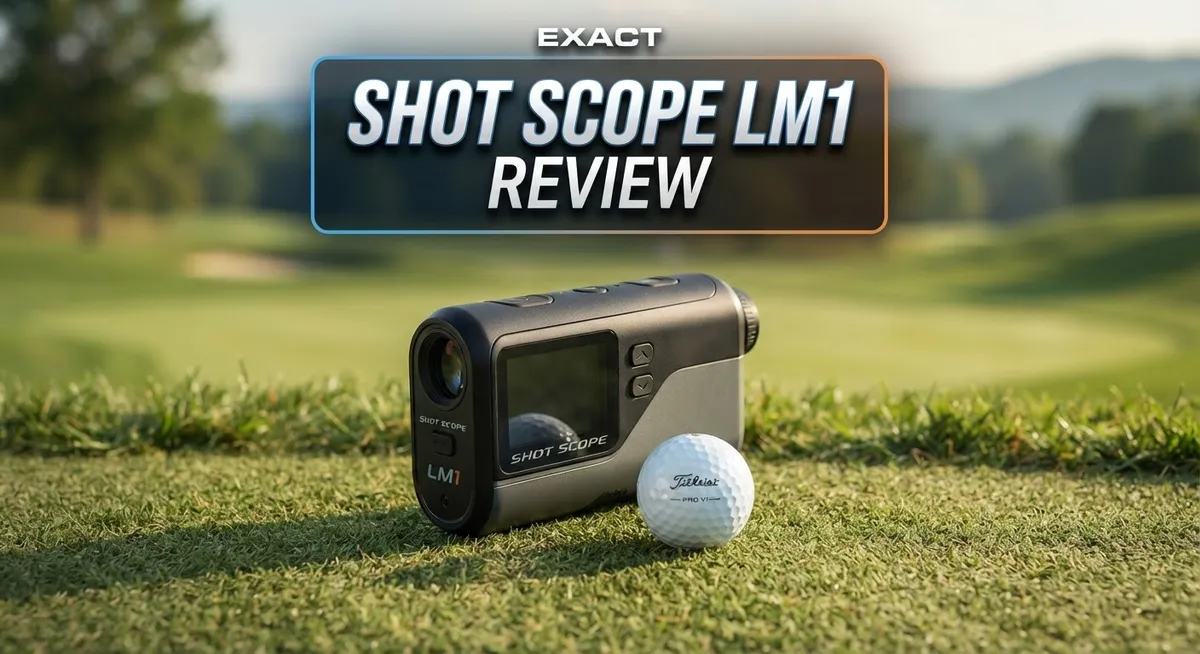
Shot Scope LM1 Review: Portable Launch Monitor for Golf Range Training
Want to know your true swing numbers without breaking the bank on fees? The Shot Scope LM1 launch monitor might be your answer.
This little device packs a punch. It tracks ball speed, club speed, and carry distance in one compact unit.
You can take it anywhere. The portable design fits easily into your golf bag or car.
Many golfers love that it skips subscription costs completely. You buy it once and use it forever.
But does it deliver accurate numbers every time? Does it work well with every club in your bag?
This review digs into real performance data. We cover what the LM1 does best and where it falls short.
You will learn if this launch monitor fits your training needs. Let’s explore what makes this device tick.
In a Nutshell
Here is a quick summary of what this launch monitor offers.
-
Accuracy stays sharp for irons and wedges. You get readings within 2 to 3 yards in most conditions. This makes practice sessions feel reliable.
-
Driver carry distance needs a second look. Numbers can drift, especially indoors or when you hit into a screen. Outdoor use gives better results for your driver.
-
The interface stays simple. You will not fight with confusing menus or setup steps. Everything feels clear from the start.
-
Build quality feels premium. This device does not feel cheap or flimsy in your hand. It holds up well during regular use.
-
You cannot delete single shots from a session. This is a small annoyance if you mishit and want clean data. Plan your sessions with this in mind.
-
Range training becomes easy and fun. The LM1 shines when you focus on iron and wedge work. It gives you real numbers without extra hassle.
This device works best as a dedicated range companion rather than an all in one solution for every club.
Key Features and Specifications
The Shot Scope LM1 brings several standout capabilities to your range sessions. Ball speed and club speed measurements form the foundation of what this monitor tracks. You get carry distance data too, which helps you understand how far each club actually travels.
The device measures these metrics without needing any subscription service. You own the data outright. This means you can track your progress over time without monthly fees eating into your budget. The data syncs to your phone or tablet, so you can review your numbers immediately after hitting shots.
Build quality stands out as a real strength here. The device feels solid in your hands. Materials resist wear from regular use at the range. Golfers appreciate that this monitor can handle being tossed in a golf bag without falling apart.
The interface keeps things straightforward. You don’t need to memorize complex menus or navigate confusing screens. New users get comfortable with the system quickly. This simplicity makes it perfect for golfers who want data without the learning curve.
Accuracy varies by club type. With irons and wedges, the LM1 delivers reliable readings within 2 to 3 yards of actual distance. This precision helps you dial in your swing mechanics. However, driver readings need more caution, especially indoors or when hitting into nets and screens. The monitor struggles to lock onto drivers as consistently as it does shorter clubs.
One limitation involves shot management. You cannot delete individual shots from a session once you record them. This means mistaken swings or practice swings stay in your data. You’ll need to work around this by keeping sessions separate if you want clean data.
The LM1 excels as a dedicated range training tool. Use it to build confidence in your numbers and track improvement over weeks and months. Pair it with solid practice routines, and you’ll see real progress. Just remember it works best for irons and wedges rather than serving as a complete solution for every club in your bag.

- Advanced Ball & Club Speed Tracking: Measures club speed and ball speed with accurate, instant feedback for...
- Real-Time Smash Factor: Displays smash factor data immediately to help you understand strike efficiency
- Total & Carry Distance Measurement: Instantly measures both carry distance and total distance for...
Last update on 2026-10-13 / Affiliate links / Images from Amazon Product Advertising API
Accuracy and Data Reliability
The Shot Scope LM1 delivers solid accuracy for most of your golf bag, but consistency depends on which clubs you swing. Here’s what you need to know before taking it to the range.
Irons and wedges perform reliably. You’ll get readings within 2 to 3 yards of actual carry distance in most conditions. This level of precision works great for tracking progress and identifying swing patterns. Your short game data stays trustworthy, which matters since many golfers spend half their range time with these clubs anyway.
Driver readings require caution. The LM1 struggles with driver carry distance, especially indoors or when hitting into screens. If you want accurate numbers on your longest club, this monitor shows its limits. Outdoor driver sessions perform better than indoor ones, but expect some variance. This weakness matters if driver data forms a big part of your training focus.
The device measures ball speed and club speed accurately across most situations. These metrics stay consistent and reliable. You can trust these numbers to guide your swing adjustments and equipment choices.
Data reliability improves with good conditions. Bright outdoor ranges produce cleaner readings than dim indoor facilities. Hitting into open space works better than hitting into screens or nets. The LM1 performs best when you give it clear sight lines to track the ball flight.
One frustration affects data management. You cannot delete individual shots from a session, so mistaken swings or warm up shots stay in your data. This limitation means you’ll need to work around flawed sessions rather than clean them up.
The interface stays simple enough that you won’t fight the technology. You get your numbers quickly and move to the next shot. This straightforward approach actually helps with data accuracy since you spend less time fiddling with settings and more time swinging.
Think of the LM1 as a specialist rather than a generalist. It excels with irons and wedges on outdoor ranges. Driver enthusiasts and indoor golfers should understand these limitations before committing. For range training focused on short and mid irons, this monitor delivers the accuracy you need.
Design, Portability, and Build Quality
The Shot Scope LM1 feels like a device built for golfers who move between the range and practice facilities. Its compact frame fits easily into a golf bag pocket or range session carry case. You can grab it and go without wrestling with cables or setup stands.
The build quality impresses immediately. The unit has a solid, premium feel that suggests it will handle regular transport and occasional drops. The materials feel durable rather than cheap or plastic-heavy. The exterior construction suggests Shot Scope invested in longevity here.
Portability stands as one of the LM1’s strongest selling points. Unlike larger launch monitors that require dedicated space or mounting systems, this device operates independently. You place it on the ground, step back, and start hitting. No tripod assembly needed. No complicated alignment procedures slow you down.
The interface keeps things straightforward. The screen displays your key metrics without overwhelming you with options. You see ball speed, club speed, and carry distance in real time. Scrolling through menus feels intuitive. Even if you’ve never used a launch monitor before, you’ll figure out navigation quickly.
One practical advantage involves portability between locations. Shot Scope LM1 owners frequently mention taking their device to different ranges or practice facilities. The device adapts to new environments without recalibration hassles. You simply place it down and begin your session.
The compact design does create one trade off. The smaller screen means you squint occasionally in bright sunlight or struggle to read numbers from a distance. This matters less if you stand close to the device, but it’s worth noting for group training scenarios.
Storage and travel become genuinely convenient. The LM1 doesn’t demand special cases or protective boxes, though many owners use small pouches for safety. It fits beside your golf shoes in a standard gym bag.
The overall portability package makes the LM1 particularly appealing for range warriors. You get serious launch monitor capability without the bulk or setup complexity of premium competitors. This balance between function and convenience defines the device’s practical appeal for everyday golfers.
Top 3 Alternatives
Garmin Approach S70

- Stunning 1.4” AMOLED display brings more than 43,000 preloaded full-color CourseView maps to life on your...
- Look good on and off the course with a lightweight, stylish design and ceramic bezel
- Battery life: up to 16 days of battery life in smartwatch mode and up to 20 hours in GPS mode

Last update on 2026-09-20 / Affiliate links / Images from Amazon Product Advertising API
The Garmin Approach S70 gives you a full-color touchscreen that shows you every detail on the course. You get preloaded golf courses worldwide, so you always know where you stand. The device tracks your shots automatically, which means less manual input and more time playing.
This watch pairs easily with your phone and sends you notifications. Battery life stretches for multiple rounds, keeping you in the game longer. The vibration alerts help you stay focused without distracting other players.
GolfBuddy Voice 2

- One-Button Precision: GOLFBUDDY Voice 2S+ is a talking golf GPS, providing precise distances to the front...
- Seamless Navigation with Audio and Screen Updates: Enjoy real-time distance information on both audio and...
- Long-Lasting Battery for Extended Rounds: Powered by a fully charged battery lasting up to 18 hours in golf...
Last update on 2026-09-20 / Affiliate links / Images from Amazon Product Advertising API
GolfBuddy Voice 2 speaks distances to you, making it simple and quick. You don’t need to look at a screen while you’re focused on your swing. Just press a button and hear the yardage to the front, middle, and back of the green.
The device covers over 40,000 courses globally. It’s lightweight and fits easily in your pocket or bag. Battery life lasts for 20 hours, so one charge handles a full day of golf.
Arccos Caddie Smart Sensors

- The GEN 4 system includes 16 weather-resistant, ultra-light, sensors (one for every club in your bag...
- FREE first year's membership to the award winning Arccos app from date of activation for new users only...
- Track Your Game Like The Pros, Arccos Is The Official Game Tracker of The PGA TOUR
Last update on 2026-09-20 / Affiliate links / Images from Amazon Product Advertising API
Arccos Caddie Smart Sensors attach to your club grips and track every shot you take. The system learns your distances and patterns over time. You get personalized club recommendations based on your actual performance data.
The mobile app shows you detailed statistics about your game. You can see which clubs perform best and where you lose the most strokes. This data helps you make smarter decisions on the course and practice more effectively off it.
Ease of Use and User Interface
Getting started with the Shot Scope LM1 takes just minutes. The screen displays information in a clean, logical layout that doesn’t overwhelm you with options.
The menu system feels intuitive. You navigate through basic settings without hunting through confusing submenus. Most golfers pick up the controls on their first visit to the range. The buttons respond quickly, and the touchscreen remains responsive even in bright sunlight.
Setting up a new session requires only a few taps. You select your club, confirm the shot, and the LM1 captures your data automatically. No complicated calibration steps or lengthy initialization periods slow you down.
Reading your results happens instantly. Ball speed, club speed, and carry distance appear on screen right after each swing. This real time feedback helps you understand your performance without waiting for a companion app or separate device to sync data.
The display remains readable in various lighting conditions. Outdoor ranges present no visibility issues. Indoor facilities work fine too, though darker spaces require slightly more focus on the screen.
One small learning curve involves understanding which metrics matter most for your training goals. New users sometimes feel overwhelmed by all available data points initially. A quick scan of the manual clears this up within minutes.
Navigating between shots feels smooth. You move forward and backward through your session history easily. Reviewing past swings takes just a few taps, making it simple to spot patterns in your performance.
The interface avoids unnecessary complexity. Shot Scope didn’t load the LM1 with features you’ll never use. Instead, they focused on keeping essential functions accessible and straightforward.
Connecting to external devices requires minimal effort. The LM1 syncs with your smartphone through a simple app connection. Pairing happens automatically once you complete initial setup.
The overall experience prioritizes simplicity over flashy features. You get the information you need without drowning in unnecessary details. This approach makes the LM1 particularly appealing for golfers who want quick feedback during practice sessions rather than extensive analysis tools.
Performance Across Club Types
The Shot Scope LM1 performs differently across your bag, and understanding these differences helps you get the most from your training sessions.
Irons and wedges shine with this device. You’ll receive consistent, reliable readings that fall within 2 to 3 yards of actual carry distance. These clubs benefit from the LM1’s radar technology, which tracks club and ball speed with impressive accuracy. Short irons, mid irons, and long irons all register cleanly on the display.
Wedges deliver some of the LM1’s best performance data. The compact size and sensor positioning work particularly well for shots under 150 yards. If you spend significant time working on your short game, the LM1 provides trustworthy feedback that matches real world results.
Driver performance requires a different approach. The LM1 struggles with carry distance readings when you hit drivers, especially indoors or into screens. Many users report that driver distance measurements sit well below actual carry numbers. This limitation matters most if your primary training focus involves driver optimization.
The good news? Club speed and ball speed readings remain accurate even with drivers. You can track your swing mechanics and club face contact quality without worrying about distance reliability. This makes the LM1 useful for driver technique work, just not for pure distance validation.
Hybrid and fairway wood readings fall between these extremes. They perform more reliably than drivers but sometimes show minor variance compared to irons. Most golfers find these measurements helpful for general practice feedback.
Environmental conditions affect all club types. Bright outdoor ranges produce cleaner data than dim indoor facilities. Wind and rain can introduce minor inconsistencies, though the LM1 handles moderate weather better than many competitors.
For serious driver distance tracking, you might feel limited. But for comprehensive iron and wedge training, the LM1 delivers solid, actionable data. Many golfers accept the driver limitation because their primary focus involves short game and approach shot consistency anyway.
Pros and Cons
Pros
- Accurate data within 2-3 yards on irons, wedges, and club speed measurements
- No subscription fees ever required to use the device
- Simple interface gets you started in minutes without confusing menus
- Premium build quality feels solid and lasts through regular use
- Excellent for range training and practice facility sessions
Cons
- Driver carry distance readings become unreliable, especially indoors or into screens
- You cannot delete individual shots from a session once recorded
- Fewer data metrics compared to premium launch monitors on the market
- Limited performance with drivers means you’ll rely on club speed data instead of carry distance
Who Should Buy It
The Shot Scope LM1 works best for golfers who want simple, accurate feedback without complexity. You’ll get the most value if you spend significant time at the range or practice facility.
If you’re an iron and wedge player, this device shines for you. Your data will be consistent and reliable, falling within 2 to 3 yards on these clubs. You can trust the readings enough to make real swing changes based on what you see.
Range enthusiasts love the LM1 because it tracks your progress shot by shot. You can monitor ball speed and club speed instantly after each swing. This real-time feedback helps you understand what a good swing feels like versus a poor one.
Golfers who hate subscription fees find this monitor appealing. You own the device outright and never pay monthly charges to keep using it. No hidden costs appear down the road.
The LM1 suits players who value portability and ease of use. The compact design fits in your golf bag without taking up much space. Setup takes only minutes, and you start collecting data right away.
However, you should look elsewhere if driver data matters most to your training. The LM1 struggles with carry distance readings on drivers, especially indoors or into nets. If you focus heavily on driver improvement, consider a monitor with stronger driver performance.
This monitor isn’t ideal for golfers who want premium metrics and advanced analysis. You won’t get launch angle, spin rate, or other detailed statistics. The data stays simple and focused on the basics.
You should also skip the LM1 if you need to delete individual shots from sessions. Once you record a swing, it stays in your data. This limitation matters if you accidentally record mishits or practice swings you’d rather exclude.
Budget-conscious players who practice regularly find the LM1 hits the right balance between capability and simplicity. You get dependable feedback on the clubs where it matters most, without paying for features you don’t need.
Final Verdict
The Shot Scope LM1 earns its place as a solid choice for golfers who want honest feedback without fuss. It does what it promises for most club types.
Think of this monitor as a training partner, not a data scientist. It won’t replace a full swing analysis system. But it will help you understand your tendencies session after session.
Consistency is the real strength here. Golfers who use the LM1 regularly notice steady patterns in their ball flight and swing habits. That kind of feedback builds real improvement over time.
If you already own a premium monitor like the Garmin R10 or Flightscope Mevo, the LM1 won’t replace it. But as a secondary device for quick range sessions, it holds its own.
Compared to the Voice Caddie SC4 Pro or Garmin Approach G82, the LM1 keeps things refreshingly simple. There’s no learning curve and no clutter of extra features you’ll never use.
Beginners especially benefit from this straightforward setup. You don’t need to be tech savvy to get useful numbers on your first session.
Serious competitive players chasing tournament level precision might find the metrics too basic. They may need deeper swing path or spin data that this device doesn’t offer.
For everyday golfers though, the LM1 nails the essentials. Speed, distance, and consistency tracking cover what most players actually need.
The device also travels well. Its portable design means you can bring it to different ranges without hassle.
In short, the Shot Scope LM1 fits golfers who value simplicity over complexity. It rewards players focused on steady improvement rather than deep technical analysis.
Choose this monitor if you want dependable numbers without extra noise. Skip it if your training depends on driver precision or advanced swing metrics.
For the majority of golfers building consistency shot by shot, the LM1 delivers exactly what it promises.
Frequently Asked Questions
Does the Shot Scope LM1 work indoors?
Yes, the LM1 works indoors, but with a catch. It measures ball speed and club speed reliably in indoor spaces. However, carry distance readings become unreliable when you hit into screens or nets indoors. The device struggles to track ball flight accurately without open space. If you use it at an indoor bay, focus on club speed and ball speed data instead of carry distance.
Can I use the LM1 without a smartphone?
The LM1 connects to your phone via Bluetooth to display data and store your shots. You need a smartphone to see your metrics and track sessions over time. Without a phone, you won’t access the app or any recorded information. That said, setup takes just a few minutes once you download the Shot Scope app.
Which golf clubs work best with the LM1?
Irons and wedges deliver the most accurate readings with this monitor. The LM1 excels at tracking mid to short game shots. Driver readings tend to be less reliable, especially indoors or into screens. If your training focuses on irons and wedges, you’ll get excellent feedback. Drivers require you to rely more on club speed data than carry distance numbers.
How does the LM1 compare to other affordable monitors?
The Shot Scope SC200 Plus offers similar simplicity and accuracy. The Voice Caddie SC4 Pro adds more features but increases complexity. The Garmin R10 provides more advanced metrics if you want deeper analysis. The LM1 wins on straightforward design and ease of use. Choose the LM1 if you want honest feedback without information overload.

Tian is a passionate technology enthusiast and reviewer who explores the latest in AI tools, gadgets, and digital innovations to help readers make informed tech decisions.