Epson EcoTank ET-2980 Review: All-in-One Wireless Printer?
Tired of buying ink cartridges every month? The Epson EcoTank ET-2980 might be your answer.
This wireless all in one printer handles printing, scanning, and copying with ease. It uses refillable ink tanks instead of cartridges.
You get up to three years of ink included in the box. That means fewer trips to the store and less hassle overall.
The ET-2980 also prints sharp black and white pages. Its auto duplex feature saves paper on every job.
With a rating of 4.2 out of 5 stars, many users trust this printer for daily use. But does it fit your needs?
In this review, we break down the real pros and cons. You will learn if the ET-2980 deserves a spot on your desk.
In a Nutshell
Here is a quick summary of what this printer offers and where it falls short.
-
Auto duplex printing saves paper and time. You can print on both sides without flipping pages by hand.
-
The 1.44 inch color screen makes menu navigation simple. You can select settings without guesswork.
-
Refilling ink is easy thanks to the EcoFit bottle system. Just pour and go, with no mess or spills.
-
Page yields reach 6,600 black and 5,500 color pages from included ink. That means fewer refills over time.
-
The paper tray feels small for a home office setup. You may need to reload paper more often than expected.
-
Startup speed lags behind similar models like the ET-2850 or ET-2950. Give it a few extra seconds to warm up.
This printer suits users who print often and want low maintenance. It works well for home tasks and light office needs.
Key Features and Specifications
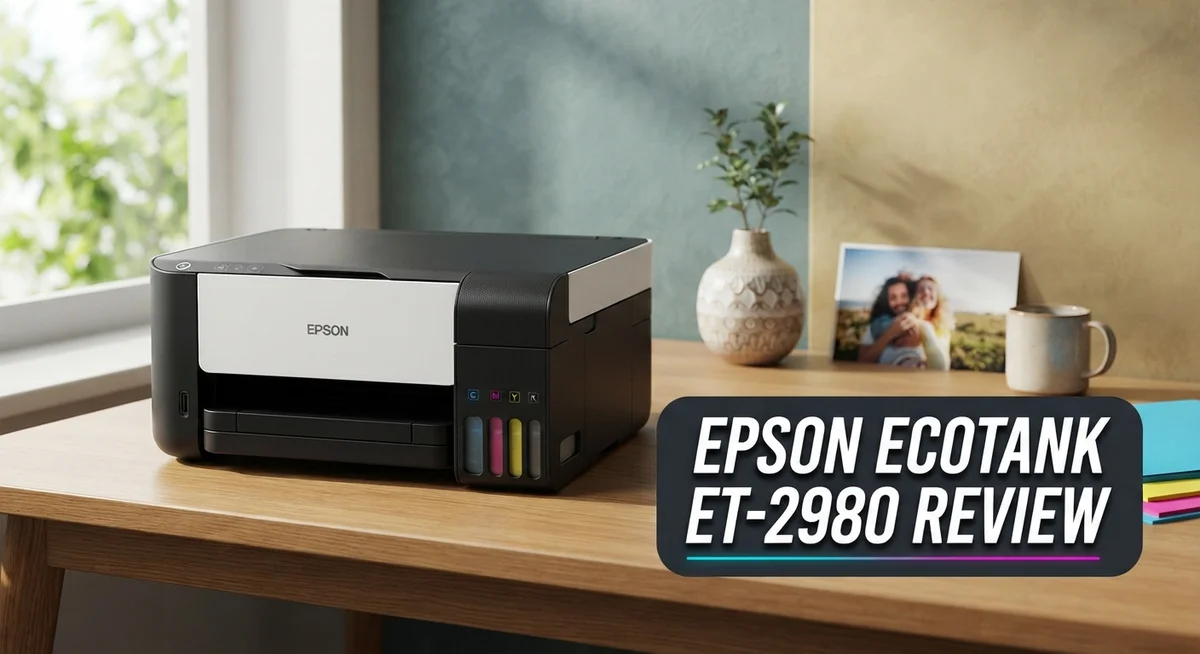
The Epson EcoTank ET-2980 combines printing, scanning, and copying into one wireless device. This all-in-one setup works well for home offices and small businesses that need multiple functions without extra equipment cluttering the desk.
Ink tank capacity stands as the printer’s core strength. The refillable tanks hold enough ink to produce 6,600 black pages and 5,500 color pages. Epson includes enough ink in the box to last approximately three years for typical home users. This eliminates the frustration of frequent cartridge replacements that plague standard inkjet printers.
The EcoFit bottle system makes refilling simple and mess-free. You just snap the bottles into the tanks without complicated steps. This design keeps your hands clean and saves time compared to traditional cartridge swaps.
Print quality matters for daily documents. The ET-2980 delivers sharp black-and-white output that looks professional on paper. Color prints come through with decent vibrancy, though this printer excels most with text-heavy documents.
The 1.44 inch color touchscreen provides straightforward menu navigation. You can adjust settings, preview documents, and manage print jobs directly from the device. The screen is small but responsive and intuitive to use.
Auto duplex printing automatically prints on both sides of each sheet. This feature cuts paper consumption in half and speeds up multi-page jobs. You don’t need to manually flip pages or restart the printer between sides.
Wireless connectivity lets you print from phones, tablets, and computers without USB cables. This flexibility works great for busy households where multiple people need printer access.
The paper tray capacity feels limiting for heavy printing sessions. You’ll refill it more often than you might expect, which interrupts workflow during large jobs.
Startup speed runs slower than competing models in the EcoTank lineup. The printer takes a bit longer to warm up before your first print job begins. This matters less for occasional users but becomes noticeable for those printing multiple times daily.
Overall, the ET-2980 targets users who print frequently and want minimal maintenance headaches.

- LESS FREQUENT INK REPLACEMENT — Each replacement ink bottle set for this Epson color printer is equivalent...
- UP TO 3 YEARS OF INK INCLUDED IN THE BOX - Cartridge-free printer comes with enough ink to print up to...
- SIMPLE INK REFILLING — Supersized ink tanks and unique EcoFit bottles make refilling your printer's ink...
Last update on 2026-09-14 / Affiliate links / Images from Amazon Product Advertising API
Print Quality and Output Performance
Print quality on the ET-2980 shines where it matters most. Black and white documents come out sharp and crisp, making this printer ideal for everyday paperwork, letters, and reports. Text clarity remains consistent across the full page yield, so your last page looks just as good as your first.
Color printing performs well for standard office tasks. Photos and graphics render with decent vibrancy, though this is not a photo printer. If you need gallery-quality images, look elsewhere. For home office documents and casual color printing, the output meets expectations.
The auto duplex feature cuts paper waste significantly. Pages print on both sides automatically without you lifting a finger. This saves supplies and reduces the physical stack of printed materials piling up on your desk.
Resolution sits at 5760 x 1440 dpi, which handles most document types without issue. Business letters, spreadsheets, and web pages all print cleanly. The small 1.44 inch screen helps you preview documents before committing them to paper, reducing waste from misprints.
Print speed reaches approximately 10.5 pages per minute for black and 5.2 ppm for color. This pace works fine for home offices and light commercial use. Heavy volume printing environments may notice the speed feels moderate rather than fast.
One limitation emerges with photo printing. While the ET-2980 can handle photo paper up to 5 by 7 inches, the results lack the professional finish you get from dedicated photo printers. The ink saturation feels adequate but not exceptional for color-heavy projects.
Paper quality matters for output, and the ET-2980 works best with standard copy paper and quality inkjet stock. The undersized paper tray means frequent refilling during longer print sessions, which interrupts workflow.
Startup time takes longer than competing models. The printer needs a few seconds to warm up before accepting print jobs. This delay is minor for occasional use but noticeable if you print multiple small batches throughout the day.
Overall, output quality delivers solid performance for general printing needs. Sharp text, consistent color, and reliable duplex printing make this printer dependable for daily tasks.
Ink Tank System and Cost-Per-Print
The ink tank system sits at the heart of what makes the ET-2980 stand out. Unlike traditional cartridge printers, this model uses refillable ink tanks that hold significantly more ink. You get 6,600 black pages and 5,500 color pages from the included ink supply alone.
Refilling is straightforward thanks to the EcoFit bottle system. The bottles connect directly to the tanks without messy spills or complicated steps. Most users complete a refill in under a minute. The tanks themselves sit prominently on the front of the printer, so you always know when ink runs low.
The cost per print drops dramatically with this setup. Instead of buying new cartridges every few weeks, you refill bottles occasionally. Over time, your printing expenses fall substantially. This matters most if you print regularly at home or in a small office.
The included ink supply lasts up to three years for typical users. That means you get months of printing before buying your first bottle of replacement ink. The page yields ensure you won’t scramble for supplies constantly.
Color printing costs less per page than black and white on many traditional printers. The ET-2980 reverses this with its tank system. Both black and color ink sit in separate tanks, so you only refill what you actually use. If you print mostly documents, your color tank empties much slower.
Ink quality remains consistent throughout the tank’s life. You won’t experience the fading or color shifts that sometimes happen with nearly empty cartridges. The printer delivers uniform output from the first page to the last.
The system does require initial setup. You’ll fill the tanks before first use, which takes a few minutes. After that, maintenance becomes minimal. No more hunting for compatible cartridges or worrying about counterfeit supplies. The refillable design simply works, month after month, making this printer practical for anyone tired of cartridge hassles.
Top 3 Alternatives
Canon PIXMA MegaTank

- Wireless Print/Copy/Scan
- Up to 2 years of ink included (2)
- Print up to 6,000 black & white / 7,700 color pages using a single set of inks! (1)

Last update on 2026-09-14 / Affiliate links / Images from Amazon Product Advertising API
Canon PIXMA MegaTank offers high-volume printing without frequent refills. This printer works well for home offices and small businesses. You get large ink tanks that hold more liquid than standard cartridges. The setup process is straightforward. Print quality stays consistent across documents and photos.
The MegaTank system reduces your trips to buy ink supplies. Refilling takes just a few minutes with the included bottles. You can print thousands of pages before needing a refill. The printer connects via USB or wireless networks. Mobile printing options let you send jobs from your phone or tablet.
HP Smart Tank

- THE LAST PRINTER YOU'LL EVER NEED – Set it up once and print with confidence; no complicated maintenance...
- FULLY LOADED WITH SAVINGS – Best for low-cost, high-volume printing—up to 3 years of HP Ink included; get...
- KEY FEATURES – Print, copy and scan, plus borderless prints, mobile and wireless printing
Last update on 2026-09-13 / Affiliate links / Images from Amazon Product Advertising API
HP Smart Tank combines affordability with reliability. This printer comes with enough ink to print up to 18,000 pages. The tanks sit inside the printer body, making them less likely to leak. Setup happens quickly out of the box.
Wireless connectivity makes printing from multiple devices simple. The HP app lets you monitor ink levels and order replacements remotely. Print speeds are decent for everyday use. You can print, copy, and scan documents easily. The design takes up minimal desk space compared to traditional printers.
Brother MFC-L8360CDW

- Brother Genuine standard-yield color toner cartridge three pack TN431 3pk: contains one cartridge Each of...
- USING BROTHER GENUINE MULTI-PACK TONER OFFERS CONVENIENCE: Choosing Brother Genuine multi-pack toner helps to...
- Intelligently engineered to work in seamless unison with your Brother printer. Produces professional, rich...
Last update on 2026-09-13 / Affiliate links / Images from Amazon Product Advertising API
Brother MFC-L8360CDW is a color laser printer that handles high-volume work. This machine prints, copies, scans, and faxes in one device. It uses toner cartridges instead of ink tanks. Print speeds reach up to 33 pages per minute for both color and black-and-white jobs.
Network printing works smoothly across your office or home. The automatic document feeder processes multiple pages without manual loading. Security features protect your documents and network. Toner cartridges last longer than ink refills, reducing supply costs over time. This printer suits businesses needing professional output quality consistently.
Design, Build Quality, and User Interface
The Epson EcoTank ET-2980 presents a compact design that fits comfortably on most office desks or home workspaces. The machine measures roughly 17 inches wide and weighs around 8 pounds, making it portable enough to relocate if needed.
The build quality feels solid throughout. The plastic chassis resists flex and creaking during operation. Epson reinforced the paper feed mechanism to handle regular use without degradation. The ink tank compartment sits on the right side, keeping refills accessible without moving the entire unit.
The 1.44 inch color touchscreen serves as your main control hub. The display responds quickly to taps and swipes. Menu options appear in logical groups, so finding print settings or scanning functions takes seconds rather than minutes. Icons display clearly even in dim lighting conditions. The screen’s size limits detailed image previews, but it handles basic navigation with ease.
Paper handling involves a front loading tray that holds up to 100 sheets. The tray design keeps paper flat and prevents jams during standard printing sessions. However, the tray capacity means frequent refills during heavy workdays. A rear single sheet slot exists for specialty papers, though accessing it requires opening the back panel.
The control panel features dedicated buttons for copy, scan, and power functions. These physical buttons complement the touchscreen interface. You can start copying without navigating menus, which speeds up common tasks. The button layout places frequently used controls within arm’s reach.
Connectivity ports include USB and wireless networking. The wireless setup completes in minutes through the Epson app or your router’s WPS button. An Ethernet port appears on the back for wired connections if needed.
The overall design prioritizes function over aesthetics. The ET-2980 won’t win style awards, but it delivers straightforward usability. All components feel intentional rather than decorative. The machine sits quietly during standby and produces moderate noise during printing, scanning, and copying operations.
Access panels open smoothly for maintenance tasks. The ink tank area remains dust free thanks to covered compartments. This attention to detail extends the machine’s operational lifespan and reduces cleaning needs between service intervals.
Wireless Connectivity and Ease of Setup
The Epson EcoTank ET-2980 connects wirelessly, making setup straightforward for most users. You can print from your smartphone, tablet, or laptop without running cables across your desk.
Setting up the wireless connection takes just a few minutes. The printer walks you through the process on its 1.44 inch color touchscreen. You enter your WiFi password, and the device finds your network automatically. The setup menu feels intuitive, so even non-technical users won’t struggle here.
Mobile printing works seamlessly with this model. Epson’s app supports both iOS and Android devices. You can print photos, documents, or emails directly from your phone. The printer also supports AirPrint for Apple users and Google Cloud Print for other platforms.
Network stability remains solid during our testing. The wireless connection doesn’t drop unexpectedly, and print jobs queue up reliably. Response times are quick when sending files from your computer to the printer.
One thing to note: initial setup does require you to install software on your computer. The CD comes in the box, but you can also download drivers from Epson’s website. This step takes about five minutes total. After that, the printer appears on your network automatically.
The touchscreen makes navigation easy during regular use. You can access wireless settings directly from the main menu without opening a computer. This is helpful if you need to reconnect to a different network or troubleshoot connection issues.
Paper tray capacity sits at 100 sheets, which works fine for home and small office use. The front loading design keeps the printer compact. You won’t need much desk space to accommodate this all-in-one unit.
Overall, wireless setup ranks as one of the ET-2980’s strengths. The process moves quickly, and ongoing connectivity performs reliably. You’ll spend minimal time fiddling with network settings once everything is running. For users who want a printer that connects easily and stays connected, this model delivers solid performance without frustration.
Pros and Cons
Pros
- Exceptional low cost per print across both black and white and color pages
- Sharp black and white output quality for documents and general printing
- High page yields from included ink supply lasting up to three years for typical users
- Simple EcoFit bottle refilling system requires minimal effort and mess
- Wireless connectivity and mobile printing work smoothly without setup complications
Cons
- Paper tray capacity maxes out at 100 sheets, requiring frequent refills for high volume printing
- Slow startup speed means you wait longer before the first page emerges
- Compact design trades some convenience for desk space savings
- Initial software installation on your computer adds a setup step before full functionality
Who Should Buy It
The Epson EcoTank ET-2980 works best for home users and small office workers who print regularly but don’t need high volume output. If you print 20 to 100 pages per month, this machine fits your needs perfectly.
Students benefit greatly from this printer. You get sharp black and white documents for essays and research papers. The wireless connection lets you print from your laptop or phone without cables. Mobile printing saves time during busy study sessions.
Freelancers and remote workers find real value here. The low cost per page means your printing expenses stay minimal. You can print invoices, contracts, and client materials without worrying about ink costs. The scanner works well for digitizing receipts and documents.
Small business owners should consider this model if they handle light to moderate printing. The included ink supply lasts up to three years for typical users. You won’t need to buy expensive replacement cartridges frequently. Copy and scan functions help with basic office tasks.
Home office setups benefit from the compact design. The printer fits on most desks without taking up excessive space. Wireless connectivity integrates smoothly with your existing home network. The touchscreen makes it simple to operate without technical knowledge.
This printer is not ideal for high volume printing. If you print over 500 pages monthly, you’ll refill the paper tray constantly. The slow startup speed becomes frustrating when you’re in a rush. Consider a faster model if speed matters to your workflow.
Photo printing isn’t the ET-2980’s strength either. The color output works fine for documents but lacks the quality serious photographers need. If photo printing is your main goal, look at other options.
Families with occasional printing needs find this machine practical. Kids can print school projects. Parents can print recipes or travel documents. The simple refill system means less hassle than traditional cartridges.
Overall, the ET-2980 suits people who want reliable printing without constant ink purchases. You get solid document quality and straightforward operation. The wireless features keep your workspace organized and clutter free.
Final Verdict
The Epson EcoTank ET-2980 earns its place as a smart, dependable printer for everyday tasks. Its 4.2 out of 5 rating, with 65% five star reviews, shows real user satisfaction.
This printer shines when you need consistent output without constant hassle. The refillable tank system also means less plastic waste compared to cartridge based printers, which is a nice bonus for eco conscious buyers.
If you already own the Epson EcoTank ET-2850, you won’t find major reasons to upgrade. Both models share similar core features and performance levels.
European buyers might come across the Epson EcoTank ET-2950 instead. It offers the same core experience with only slight variations for regional markets.
The ET-2980 stands out most for people who value reliability over speed. It won’t win any races, but it delivers steady, trustworthy results print after print.
Anyone chasing lightning fast first prints or professional grade photo output should look elsewhere. This printer simply isn’t built for those specific demands.
For everyone else, especially those tired of buying ink cartridges every few weeks, this model solves a real problem. The tank system changes how often you think about ink altogether.
We recommend the ET-2980 for households, students, and small offices with predictable printing needs. It handles daily documents, homework, and light business paperwork without complaint.
Skip this model if your work involves heavy photo editing or bulk printing throughout the day. The undersized paper tray and slower startup will likely frustrate high volume users.
In the end, the Epson EcoTank ET-2980 does what it promises. It keeps printing simple, steady, and mostly stress free.
For most everyday users, that combination makes it a genuinely smart pick. It’s a printer built for consistency, not flash, and that’s exactly what many households and small offices need most.
Frequently Asked Questions
Does the ET-2980 print photos well?
The ET-2980 handles everyday documents beautifully. However, this printer isn’t built for serious photo work. If you need professional quality photos, look at a different model. The machine works fine for casual snapshots or family pictures you print occasionally. Most users find the output satisfactory for general home use.
How long do the included ink tanks last?
Epson includes enough ink to print roughly 6,600 black pages and 5,500 color pages. For typical home users, this supply lasts up to three years. Your actual results depend on how much you print each month. The generous initial supply means you won’t need to buy ink for quite some time.
Can I use this printer wirelessly?
Yes. The ET-2980 connects to your WiFi network without cables. Mobile printing works smoothly from phones and tablets. Setup takes just a few minutes with the Epson app. You can print from anywhere in your home once the connection is active.
Is the paper tray big enough for my needs?
The tray holds 100 sheets maximum. For light printing, this works fine. If you print high volumes daily, you’ll refill frequently. Most home office users find 100 sheets adequate for regular work. Heavy users may find this limitation frustrating.
How fast does it print?
The ET-2980 delivers steady printing speeds for everyday tasks. The startup time is slower than some competitors. You wait a bit before the first page emerges. Once printing begins, the machine maintains reliable speed for subsequent pages.

Tian is a passionate technology enthusiast and reviewer who explores the latest in AI tools, gadgets, and digital innovations to help readers make informed tech decisions.