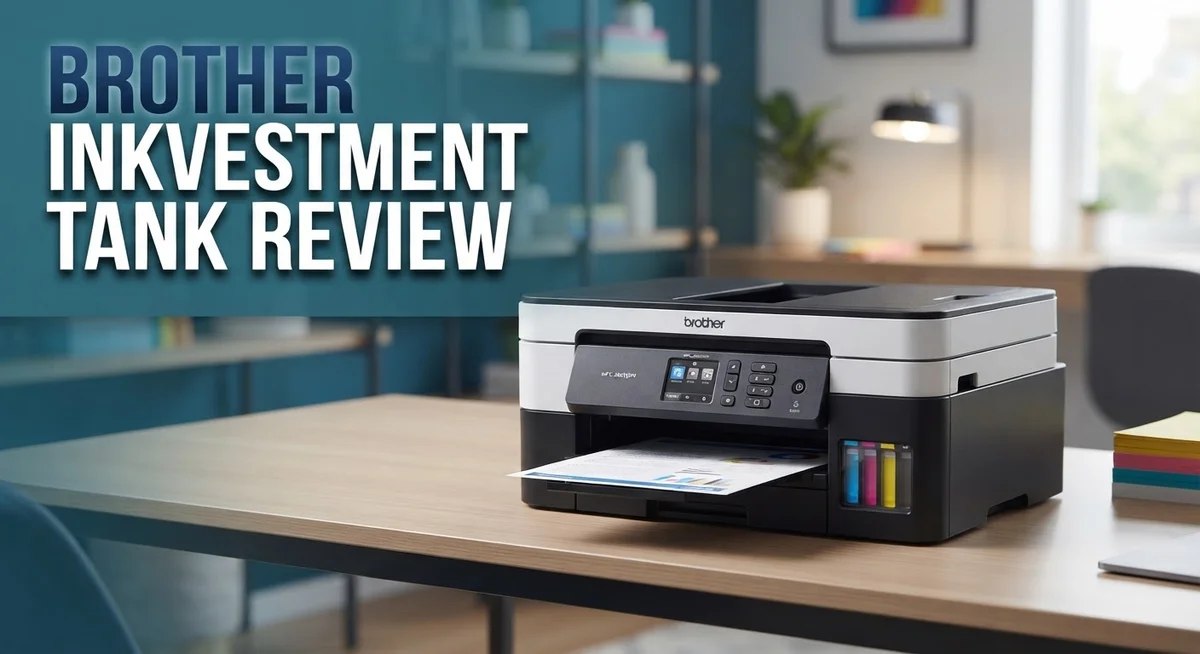
Brother INKvestment Tank Review: Is It Worth Your Money?
Do you print a lot of photos or documents at home? Then you know the pain of running out of ink fast. The Brother INKvestment Tank series promises to fix that problem.
This printer line uses specially designed cartridges that hold way more ink than usual. You get thousands of pages before needing a refill. That means fewer trips to the store and less stress about ink levels.
But is it really a “tank” system like some competitors offer? We will look closely at that question in this review.
You will learn about print quality, refill speed, and wireless features. We also cover the real pros and cons users report.
By the end, you will know if this Brother printer fits your printing needs. Let’s jump into the details and see what makes this device tick.
In a Nutshell
Here is what you need to know about the Brother INKvestment Tank lineup:
-
Cartridge based, not a true tank. Unlike Canon EcoTank, this system pours ink into special cartridges instead of an open tank. Keep this in mind before you buy.
-
Fast refills. Color ink refills take just 30 seconds. Black ink takes about 65 seconds. No mess, no spills.
-
High page yield. Each refill cycle can print thousands of pages. This works well for busy homes or small offices.
-
Print quality is solid but mixed. Most images look great. Some users report mediocre text quality on certain models.
-
All-in-one functionality. Models like the MFC-T580DW offer printing, scanning, and copying. Wireless connectivity makes setup simple.
-
Yield claims need scrutiny. Some reports suggest the actual page yield falls short of advertised numbers. Always test your own usage patterns.
This printer works well for everyday printing tasks. Just understand its cartridge based design before you decide.
Ink Tank System and Cartridge Design
The Brother INKvestment Tank system uses refillable cartridges that hold significantly more ink than standard cartridges. This design lets you print far more pages before needing a refill.
When you need to refill, the process is quick and simple. Color ink takes about 30 seconds to refill, while black ink takes around 65 seconds. The refill bottles come with a no spill design, so you won’t make a mess on your desk or printer.
Each refill cycle can produce thousands of pages before you need to refill again. This high yield is one of the main reasons people choose this system over traditional cartridge based printers.
However, it’s important to understand what this system actually is. Brother calls it a “tank” system, but it’s not a true tank like some competitors offer. Canon EcoTank, for example, uses a pour bottle system where you add ink directly into built in tanks inside the printer. The Brother system still uses cartridges, just larger ones that you refill instead of replace entirely.
This distinction matters if you’re comparing options. The cartridge based approach means you still swap out cartridge units, but you refill them multiple times instead of throwing them away after one use.
Print quality from these models is generally solid for everyday use. Most documents and photos come out looking good. The all in one models like the MFC T580DW add copying and scanning to your printing capabilities, making them useful for home offices.
One thing to watch for is yield claims. Some users report that actual page counts fall short of what Brother advertises. It’s worth checking real world reviews from people who’ve used the printer for several months.
The wireless connectivity on these models lets you print from your phone or computer without cables. This convenience works well for busy households or small offices where people need quick access to printing.

- INNOVATIVE REFILLABLE INK TANK TECHNOLOGY: Brother Genuine no-spill bottles quickly refill the tank in 30 seconds for...
- BEST FOR HOME OFFICE AND SMALL OFFICE: This does-it-all multifunction printer enables you to print, copy, and scan on...
- WIRELESS AND USB CONNECTIONS: Connect your way. Interface with your printer on your wireless network or via USB.
Last update on 2026-09-14 / Affiliate links / Images from Amazon Product Advertising API
Print Quality and Speed Performance
Print quality from Brother INKvestment Tank models delivers solid results for everyday documents and photos. Most users report sharp text and vibrant colors for standard printing tasks. The output works well for home offices and small businesses that print frequently.
Speed performance is one of the stronger points here. These printers handle print jobs quickly compared to older inkjet models. You will notice faster output when printing multiple pages or batches of documents. The wireless connectivity means you can send print jobs from your phone or laptop without waiting for cable connections.
Refill speed matters when you print a lot. Color ink refills take just 30 seconds, while black ink refills need about 65 seconds. This quick turnaround keeps you printing without long interruptions. The refill bottles use a no spill design, so you won’t deal with messy ink accidents during the process.
One important note about page yield: some users report that actual pages printed fall short of Brother’s advertised numbers. You should expect fewer pages per refill than the marketing claims suggest. This gap between advertised and real world results is worth knowing before you buy.
Text quality shows mixed feedback from users. While most everyday documents print clearly, some people noticed that text sharpness doesn’t match premium laser printers. If you print lots of formal business documents, this might matter to your standards.
Photo printing performs better than text printing on these models. Images show good color accuracy and detail. The ink laydown produces decent results for home photo projects and casual printing needs.
The all in one functionality adds value to your setup. Models like the MFC T580DW combine printing, scanning, and copying in one device. This saves desk space and simplifies your workflow.
Overall, print quality and speed work well for typical home and small office use. You get fast refills, reasonable output quality, and wireless convenience. Just remember that actual page yields may differ from what Brother advertises, so plan your refill schedule accordingly.
Refill Process and Page Yield
The refill process on Brother INKvestment Tank models is straightforward and fast. Color ink takes about 30 seconds to refill, while black ink needs roughly 65 seconds. This speed makes a real difference when you print frequently.
The refill bottles themselves are designed to minimize mess. You simply open the ink access door on the printer, locate the correct cartridge, and pour the ink directly into it. The bottles have a specific nozzle shape that fits the cartridge opening, reducing spills during the process.
Page yield is where these printers stand out most. Each refill cycle can produce thousands of pages before you need to refill again. This high output means you spend less time refilling and more time printing. The actual number depends on your printing habits and the specific model you choose.
However, page yield claims deserve your attention. Some users report that real world printing falls short of Brother’s advertised numbers. Factors like print density, color coverage, and document type all affect how many pages you actually get. Black ink typically lasts longer than color ink, which is normal for most printers.
One important distinction: the INKvestment Tank system uses refillable cartridges rather than a true tank system. This means you’re still working with cartridges, just ones that hold more ink than standard models. The cartridges stay in the printer while you refill them, unlike some competitors that use a direct pour system.
The refill bottles come in separate colors for cyan, magenta, yellow, and black. Keeping track of which bottle is which prevents mistakes. Most models include a clear indicator showing ink levels, so you know when refilling is necessary.
The bottom line: refilling is quick and the page yield per cycle is genuinely high. Just remember that actual results vary based on your specific printing needs. Monitor your first few refill cycles to understand your true page yield. This helps you plan refills better and avoid running out of ink unexpectedly.
Top 3 Alternatives
Canon PIXMA Megatank

- Wireless Print/Copy/Scan
- Up to 2 years of ink included (2)
- Print up to 6,000 black & white / 7,700 color pages using a single set of inks! (1)

Last update on 2026-09-14 / Affiliate links / Images from Amazon Product Advertising API
The Canon PIXMA Megatank offers high-volume printing without frequent refills. This system holds significantly more ink than standard cartridges. You get consistent color quality across thousands of pages. The large tanks sit inside the printer, making refills straightforward and mess-free.
Canon designed this line for households and small offices that print regularly. The ink bottles are easy to identify by color. Setup takes just minutes. You’ll notice fewer trips to buy replacement cartridges.
Epson EcoTank Series

- INNOVATIVE CARTRIDGE-FREE PRINTING — No more dealing with lots of tiny ink cartridges; With this wireless document and...
- LESS FREQUENT INK REPLACEMENT — Replacement ink bottles don't have to be changed nearly as often as ink cartridges...
- COLOR PRINTING — Up to 2 years of ink in the box4 (and with every replacement ink set) for fewer out-of-ink...
Last update on 2026-09-13 / Affiliate links / Images from Amazon Product Advertising API
Epson’s EcoTank line brings serious ink capacity to your desk. These printers come with full tanks from day one, unlike cartridge-based models. You can print thousands of pages before needing new bottles.
The refill bottles are simple to use. Just open the tank caps and pour in the ink. The system prevents spills through smart bottle design. Epson EcoTank models work well for families, students, and remote workers who need reliability.
Many users appreciate the lower cost per page over time. The printers deliver sharp text and vibrant photos. Maintenance is minimal since you’re not constantly swapping cartridges.
HP Smart Tank

- THE LAST PRINTER YOU'LL EVER NEED – Set it up once and print with confidence; no complicated maintenance, just easy...
- FULLY LOADED WITH SAVINGS – Best for low-cost, high-volume printing—up to 3 years of HP Ink included; get up to...
- KEY FEATURES – Print, copy and scan, plus borderless prints, mobile and wireless printing
Last update on 2026-09-13 / Affiliate links / Images from Amazon Product Advertising API
HP Smart Tank printers combine convenience with wireless printing features. These machines include substantial ink supplies right out of the box. The tanks refill easily using labeled bottles that match each color.
HP built these printers with app connectivity. You can print from your phone or tablet without cables. The tanks are positioned for simple, clean refilling. HP Smart Tank models suit remote workers and busy families equally well.
The ink system reduces environmental waste from discarded cartridges. Print speeds stay fast even during high-volume jobs. These printers handle everyday documents and photo printing with ease.
Multifunction Capabilities and Connectivity
Brother INKvestment Tank printers excel at handling multiple tasks in one device. These all-in-one models let you print, copy, and scan from a single machine. This saves desk space and keeps your workflow simple.
The wireless connectivity feature is genuinely useful. You can send documents to print from your smartphone, tablet, or laptop without plugging in cables. The network setup takes just a few minutes, and most users find it straightforward to connect.
Scanning functionality works well on these models. You can digitize documents directly to your computer or send them to cloud storage services. The copy feature produces acceptable results for everyday needs, though text clarity varies depending on the original document quality.
One practical advantage is the multi-page automatic document feeder available on certain models. This means you can load a stack of papers and let the machine scan or copy them without stopping. It’s helpful if you process documents regularly.
The all-in-one design does come with a trade-off. These printers tend to be bulkier than single-function models. Make sure you have enough room on your desk or shelf before purchasing.
Mobile printing support adds real convenience to daily use. Brother’s app allows you to print photos and documents straight from your phone. The connection stays stable, and the process rarely requires troubleshooting.
Connectivity options include USB, Ethernet, and WiFi. This flexibility means you can choose the connection method that works best for your home or office setup. Switching between connection types is simple if your needs change.
The scanner resolution is adequate for most household tasks. Document scanning produces clear, readable digital files. Photo scanning works reasonably well, though professional-grade results require higher-end equipment.
Overall, the multifunction capabilities on Brother INKvestment Tank models deliver solid performance for everyday office work. The wireless connectivity removes cable clutter from your workspace. These features combine to create a practical all-in-one solution for households and small offices that need printing, copying, and scanning in one device.
Cost Per Page Analysis
The cost per page metric matters most when you print regularly. Brother INKvestment Tank systems deliver genuine savings over time because each refill cycle produces thousands of pages before you need another bottle.
Let’s break down what you actually get. Black ink refills last longer than color refills. A single black cartridge can handle significantly more pages than a cyan, magenta, or yellow cartridge. This means you’ll refill black less often, which reduces your overall printing costs.
The refill bottles are designed to be economical. You pour ink directly into the cartridge tanks using no-spill bottles. The process takes just 30 seconds for color and 65 seconds for black. Since refilling happens so quickly, you spend less time away from your work.
One critical point deserves attention here. Brother’s advertised page yields sometimes exceed what real users experience. Some owners report that actual pages printed fall short of the company’s claims. This gap affects your real cost per page calculation. You should verify independent user reviews before making your final decision.
Compare this to standard cartridge systems. Traditional inkjet cartridges run out much faster and cost more to replace frequently. The INKvestment Tank approach reduces how often you purchase new supplies. However, remember that this system uses refillable cartridges, not a true direct tank like some competitors offer.
The multifunction nature of these printers also impacts your total cost of ownership. You get printing, scanning, and copying in one device. This eliminates the need to buy separate machines, which saves you money upfront and on desk space.
Your actual savings depend on printing volume. Light users might not see dramatic differences. Heavy users who print hundreds of pages monthly will notice significant reductions in supply costs. The more you print, the better the economics work in your favor.
Track your page counts over several months to understand your personal cost per page. This real data helps you see whether the INKvestment Tank system truly delivers the savings Brother promises.
Pros and Cons
Pros
- Refill bottles feature no-spill design, making the process quick and mess-free in about 30 to 65 seconds
- Each refill cycle produces thousands of pages, meaning you refill far less often than with standard cartridges
- All-in-one models handle printing, scanning, and copying without needing separate devices
- Wireless connectivity lets you print and scan from your phone or computer anywhere in your home
- Automatic document feeders on select models speed up scanning and copying jobs
Cons
- The system uses refillable cartridges rather than a true direct-pour tank, which some users find less convenient than competitor designs
- Ink yield claims have been questioned by reviewers who report actual results differ from marketing statements
- Text quality falls short of what you get with laser printers or higher-end inkjet models
- Real cost savings depend heavily on your printing volume; light users may see minimal difference compared to standard cartridge printers
Who Should Buy It
The Brother INKvestment Tank is best for people who print regularly. If you print dozens of pages each week, this printer makes sense for your situation. Heavy users see the biggest benefit from the refill system.
Small business owners benefit too. You might run a home office, handle invoicing, or manage client documents. The multifunction capabilities let you print, scan, and copy without buying separate machines. This saves space and simplifies your workflow.
Students and educators find value here as well. Long school years mean lots of printing. The frequent refills keep costs manageable when you’re working on tight budgets. The scanner works well for digitizing notes and documents.
Families who print homework, permission slips, and photos will appreciate fewer trips to buy cartridges. Kids need printed materials constantly. You spend less time shopping and more time printing what you need.
If you scan documents regularly, the all-in-one design works perfectly. You get printing, scanning, and copying in one device. The automatic document feeder on certain models speeds up batch scanning jobs. This matters if you handle stacks of papers weekly.
Remote workers benefit from wireless connectivity. You can print from your phone or laptop anywhere in your home. This flexibility helps when you’re managing multiple projects at once.
The Brother INKvestment Tank is not ideal for light users. If you print only a few pages monthly, traditional cartridges might serve you better. The refill system shows its advantage when you use high page volumes consistently.
People who want the simplest refill experience should compare this to direct tank pouring systems. The Brother uses refillable cartridges rather than pouring ink directly into a tank. Some users find this slightly less convenient, though the no-spill bottles do make refilling quick and easy.
Choose this printer if you value low cost per page and hate buying cartridges frequently. The system delivers on that promise for regular printing households and offices.
Final Verdict
The Brother INKvestment Tank earns a solid spot for anyone tired of constant cartridge shopping. It delivers real convenience through fewer refills and steady print quality across daily tasks.
That said, this printer works best when you match it to your actual needs. It shines brightest for consistent, high volume printing rather than occasional use.
Think about your printing habits before deciding. If you print weekly reports, school assignments, or business documents, this system fits naturally into your routine.
Casual users might find simpler printers more practical. The refill cycle only pays off when you print enough to notice the difference.
Compare your options carefully. Canon EcoTank offers direct bottle pouring, while Brother sticks with cartridge based refills that some find less hands on.
Neither approach is wrong. It simply depends on what feels easier to you.
If you like predictable refill routines and steady output, Brother delivers that experience well. The wireless features and all-in-one design add extra value for busy households and small offices.
Reliability matters too. Users report dependable performance over time, even with heavier printing schedules.
Print quality remains solid for everyday documents, though some feel text sharpness could improve slightly. This shouldn’t discourage typical home or office use.
Weigh your priorities honestly. Do you print often enough to justify fewer cartridge changes? If yes, this printer likely suits you well.
For light or occasional printing, a standard inkjet might serve you just as well without extra features you won’t use.
In short, the Brother INKvestment Tank offers a practical solution for people who print regularly and want fewer interruptions. It won’t work for everyone, but it fits its target audience nicely.
Consider your printing frequency, scanning needs, and preference for wireless setup. These factors will guide you toward the right choice for your space.
This printer earns its reputation through consistency, not flashy extras. That makes it a dependable pick for steady, everyday printing needs.
Frequently Asked Questions
Does the Brother INKvestment Tank use a true tank system like Canon EcoTank?
No, it does not. Brother uses refillable cartridges instead of a direct pour tank. You insert cartridges into the printer, then refill them with bottled ink. Canon EcoTank lets you pour ink straight into built-in tanks without cartridges.
Both systems reduce how often you buy ink. The key difference is the refill method. Some users prefer the direct pour approach for speed. Others find the cartridge method just as simple.
How many pages can I print before refilling the ink?
You get thousands of pages per refill cycle. The exact number depends on your model and how much color you use. Black ink typically lasts longer than color.
Most users see a significant jump in page yield compared to standard cartridges. This means fewer refill trips to the store or longer stretches between ordering online.
How long does it take to refill the cartridges?
Refilling color cartridges takes about 30 seconds. Black ink takes roughly 65 seconds. The bottles are designed to prevent spills during the process.
The refill bottles make the job straightforward. You simply open the cartridge, insert the bottle tip, and squeeze. No mess or complicated steps involved.
Can I use the Brother INKvestment Tank for scanning and copying?
Yes, if you choose an all-in-one model. The MFC series includes scanning, copying, and printing in one device. Automatic document feeders on select models speed up batch jobs.
Wireless connectivity lets you scan documents to your phone or computer. This works great for home offices and small teams who need flexible document handling.

Tian is a passionate technology enthusiast and reviewer who explores the latest in AI tools, gadgets, and digital innovations to help readers make informed tech decisions.